An MCP server makes tools available to an agent without putting their implementations inside the agent. The host handles user interaction and decides when a tool is needed. An MCP client connects the host to a server; the server supplies tool definitions, executes requested tools with the given arguments, and returns results. A server can perform the work locally or connect to an API or database. section 3.4.1
Figure 3.5 MCP server–client architecture. The host contains the LLM for reasoning and user interaction, connecting through MCP clients, which manage server communication. MCP servers expose tool definitions and handle execution, optionally integrating with external services such as databases and APIs.
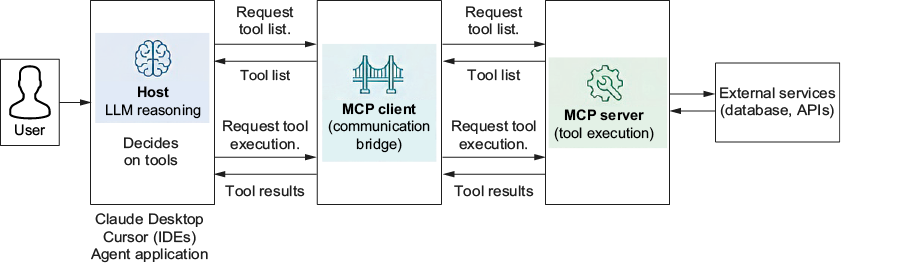
The architecture diagram separates the host’s decisions, the client’s communication, and the server’s tool definitions and execution. section 3.4.1
A tool request has two distinct stages:
- Discovery: the client asks the server for tool names, descriptions, and parameter schemas. An LLM provider may require these definitions to be converted to its own tool format. section 3.4.1 section 3.4.3
- Execution: the client sends a tool name and arguments; the server runs it and returns a result. The host can then use that result in its response. section 3.4.1 section 3.4.3
From a search function to a server
Create a FastMCP instance, decorate an existing Python search_web(query: str, max_results: int = 5) function with @mcp.tool(), and start it with mcp.run(transport='stdio'). FastMCP derives the tool schema from the function name, parameters, and type hints; the docstring supplies its description. The function can keep using the Tavily API for the search itself. A client can launch this server with uv run tavily_mcp_server.py, then initialize a session and call list_tools() to verify that search_web is exposed. section 3.4.4
Listing 3.25 Custom Tavily MCP server implementation
import os
from tavily import TavilyClient
from dotenv import load_dotenv
from mcp.server.fastmcp import FastMCP

load_dotenv()

tavily_client = TavilyClient(os.getenv("TAVILY_API_KEY"))

mcp = FastMCP("custom-tavily-search")

@mcp.tool()
def search_web(query: str, max_results: int = 5) -> str:
    """
    Search the web using Tavily API.

    Args:
        query: Search query string
        max_results: Maximum number of results to return (default: 5)

    Returns:
        Search results as formatted string
    """
    try:
        response = tavily_client.search(
            query,
            max_results=max_results,
        )
        results = response.get("results", [])
        return "\n\n".join(
            f"Title: {r['title']}\nURL: {r['url']}\nContent: {r['content']}"
            for r in results
        )
    except Exception as e:
        return f"Error searching web: {str(e)}"

if __name__ == "__main__":
    mcp.run(transport='stdio')
The implementation shows the small MCP wrapper around the search function, including tool registration and the Tavily API call. section 3.4.4
For a ready-made server, the Tavily MCP server exposes search, extraction, crawling, and mapping tools. MCP Inspector can connect to it, list those tools, and test calls before an agent uses them. The same client methods—initialize(), list_tools(), and call_tool()—work with the custom server. MCP servers may also provide prompts and resources, though neither is needed for this tool-focused flow. section 3.4.2 section 3.4.3 section 3.4.1 section 3.4.4











