An MCP server connects an AI system with selected data sources, services, prompt templates, and executable tools through the Model Context Protocol (MCP). MCP standardizes two-way connections between data sources and AI-powered tools, improving consistency and interoperability across integrations. section 8.14
An MCP server can expose:
- Data and services such as files, database records, logs, multimedia, and internal application programming interface outputs. section 8.14
- Prompt templates that guide a language model toward recurring tasks, such as analyzing application or system logs for irregularities. section 8.14
- Executable tools, such as filtering logs by time period, querying a monitoring platform, or selecting a program. section 8.14
Natural-language cloud-log queries
A Splunk MCP server can provide a tool for running Splunk queries. A cloud-security worker could then ask an MCP client and language model to investigate company logs instead of querying Splunk directly. section 8.14
Figure 8.10 An illustration of the interaction between MCP servers and clients
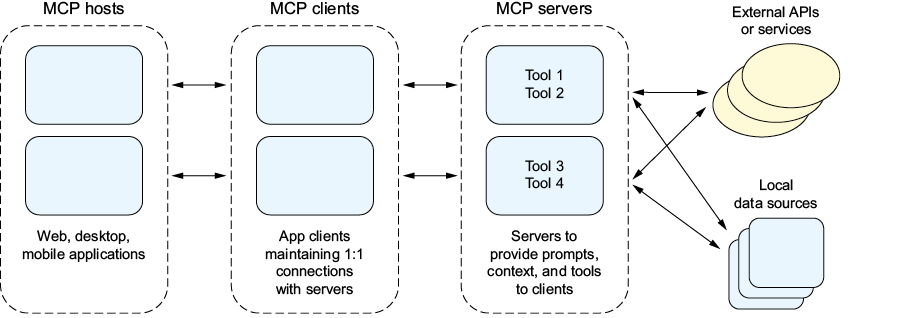
Use the interaction diagram to follow how an MCP client, server, data source, prompt, and tool fit together. section 8.14
MCP depends on services implementing servers for models to use. GUI-native agents offer a contrasting approach: they navigate existing interfaces through screen reading, clicking, and typing, without requiring each service to define an MCP server. section 8.15











