An MCP server is a standard application that implements the Model Context Protocol, connecting AI clients to external data and executable capabilities through a common interface. Clients communicate with servers using JSON-RPC 2.0, while services may expose tools, resources, and prompts. section 13.1.2 section 13.5
Use the three server components for different kinds of interaction:
- Tools provide executable functions, such as searching the web, reading files, fetching weather, converting temperatures, or generating images. section 13.1.4
- Resources expose external data, including local files, web pages, and database records, for the AI to retrieve and analyze. section 13.1.4
- Prompts provide predefined templates for standardized LLM interactions. section 13.1.4
Choose deployment and transport according to the client arrangement:
- Run locally beside the client and communicate through standard input and output streams. section 13.1.3
- Run remotely on another machine, using HTTP POST from the client and server-sent events for responses; this supports multiple clients. section 13.1.3
Minimal Python server
Install the official SDK and supporting packages with `uv add "mcp[cli]" httpx PyMuPDF`, then create `server.py`:\n\n`from mcp.server.fastmcp import FastMCP\nimport httpx\nimport fitz\nimport os\n\nmcp = FastMCP("MCP Demo")\n\nif __name__ == "__main__":\n mcp.run(transport='stdio')`\n\nRun it with `uv run server.py`. A server can then be extended with resources, tools, and prompts. section 13.2.3 section 13.2.4
Validate and integrate the server with practical workflows:
- Use the MCP Inspector to list resources, resource templates, prompts, and tools, then execute functions such as `fetch_weather`, `get_pdf`, `convert_temperature`, and `get_text`. section 13.2.9
- Connect the server to Claude Desktop, which can use custom or prebuilt MCP servers for filesystem access, web search, coding, content creation, and data analysis. section 13.3
- Keep credentials outside source code by reading `OPENWEATHER_API_KEY` from an environment variable and supplying it through the client configuration. section 13.3.5
Figure 13.3 How an MCP client communicates with an MCP server
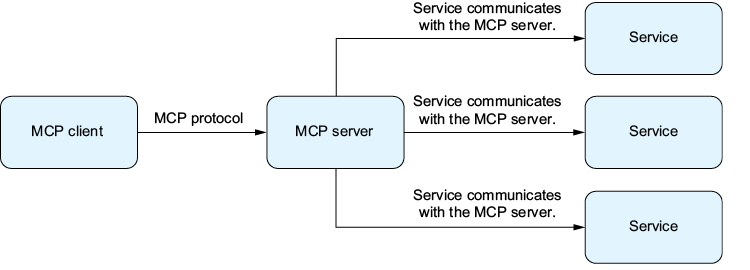
Trace the relationship between an MCP client and server before examining the server’s services. section 13.1.2











