Retrieval-augmented generation (RAG) helps a chatbot answer questions using information it was not trained on, such as your notes or company documents. Think of it as giving the AI a relevant cheat sheet before it answers. section 16.1 section 16.1.1
Figure 16.1 The RAG pipeline: a user query is matched against a document database, relevant chunks are retrieved, and the LLM generates an answer using those chunks as context.
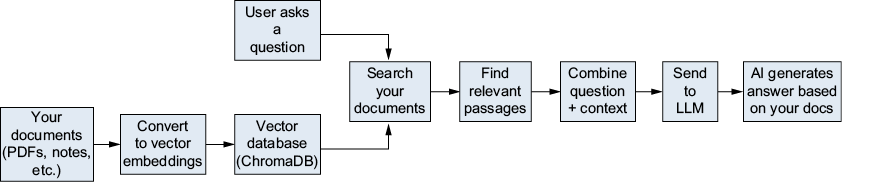
Follow the question through the pipeline: match it against documents, retrieve relevant chunks, then give those chunks to the language model as context for its answer. section 16.1.1
Choose RAG when the missing ingredient is specific knowledge. A system prompt changes instructions or format; fine-tuning changes the model’s underlying behavior. RAG instead supplies reference material for the question at hand. section 16.6.1
Try it with your own documents
Put 5–10 text files—perhaps class notes or recipes—in a my_documents folder. Run the RAG script, ask questions about the files, and check whether similarity search finds relevant content. A larger next step is a document Q&A application that processes PDFs or web pages. section 16.8 section 18.2.2