Retrieval-augmented generation (RAG) supplies a language model with relevant external information at answer time. It helps answer questions that require information the model did not see during training, such as questions about a company’s policies, products, or services. section 9.0
A RAG application combines retrieval and generation: it searches a knowledge base for material related to the user’s question, then passes the retrieved content and question to the language model. A DSPy implementation can package both steps in a custom module. section 9.2 section 9.2.2
A typical knowledge-base workflow:
- Represent the question and knowledge-base articles as vectors, then find the articles most similar to the question. section 9.2
- Pass the selected article contents and the original question to the language model to generate an answer. section 9.2
- Article titles can be used for vector search; they may work better than full articles when extra content makes embeddings less relevant. section 9.2
Customer-support questions
A chatbot answering questions about a company’s return policy can retrieve relevant policy documents and provide them with the customer’s question as context. A Wix support example retrieves knowledge-base articles to answer a question about accepting payments during account verification. section 9.0 section 9.2
Figure 9.1 The two main stages of RAG: retrieval and generation. During the retrieval stage, we search for documents that are most similar to the query. Once we have these, we can prepare the prompt by injecting the top-k results along with the user query as input for the generation stage. The LM can then generate a grounded answer based on these documents. If requested, it may also quote the source documents.
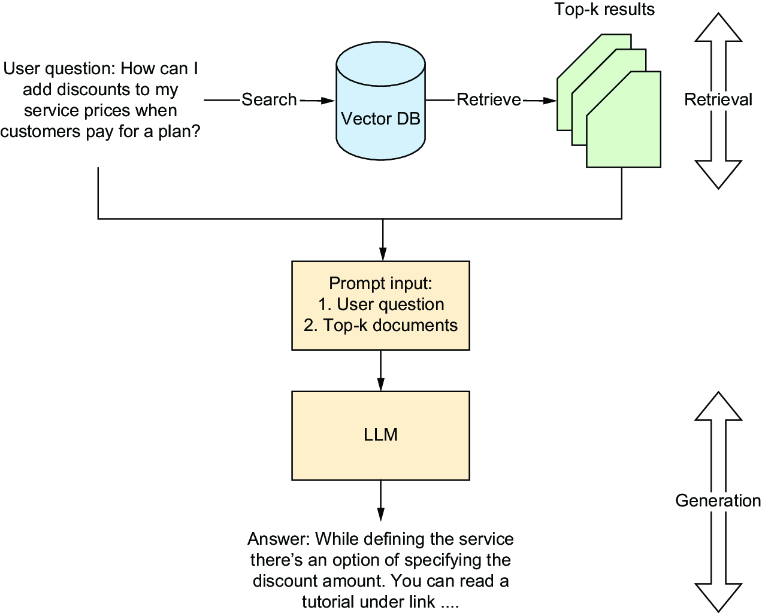
Diagram of the retrieval and generation stages, including selecting top-k documents and supplying them with the query as generation context. section 9.2