Retrieval-augmented generation (RAG) extends a language model with domain-specific information at response time. It retrieves relevant material from an external knowledge source, then integrates retrieved facts into generated text. Use it when a response needs current or specialized context—for example, turning a long document into a short data-story annotation—rather than relying on a general-purpose model alone. section 7.4 section 7.4.2
Figure 7.13 A RAG-based system
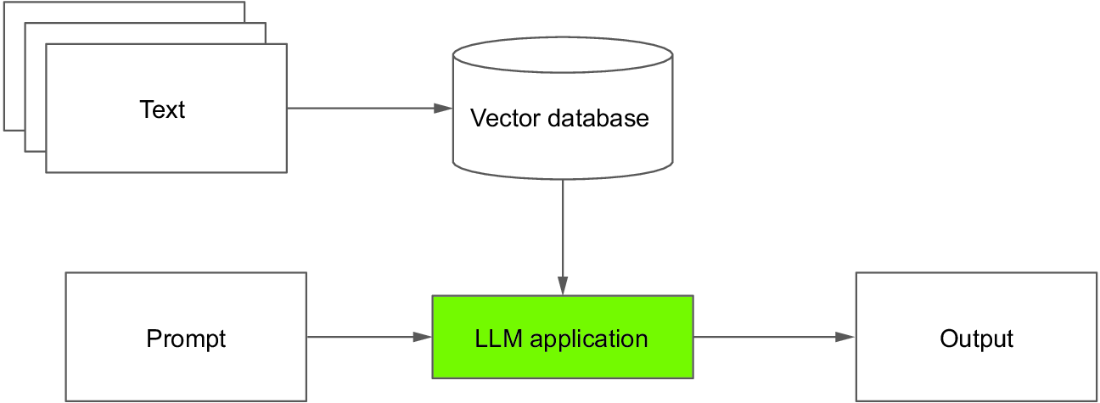
This architecture separates preparation of the knowledge source from question answering: source text becomes searchable vectors, and retrieved passages supply context for the LLM response. section 7.4.2
A practical RAG workflow is:
- Load source content, such as an HTML page, and split it into manageable text chunks. section 7.4.2
- Create embeddings for the chunks and store them in a vector database such as Chroma. section 7.4.2
- Connect the database to an LLM retriever, then ask a focused question. section 7.4.2
- Use a prompt that restricts answers to the supplied context and permits an explicit “I don't know” when context is insufficient. section 7.4.2
Generate a product commentary from a web page
Load a smartphone product-description HTML page, split and embed its contents in Chroma, and connect the store to ChatOpenAI through a RetrievalQA chain. A request to describe the New SmartX 2023 in 30 words returns a concise description along with the retrieved source documents. The same pattern can query an FDA fact sheet to produce chart commentary about aquaculture seafood safety. section 7.4.2 section 7.5.2
RAG supports contextual data storytelling: retrieve facts about a product, real-time data, customer reviews, or another topic, then generate an ad hoc commentary or annotation. Tailor the resulting context to the intended audience and place it where it helps readers understand the visualization. section 7.4.2 section 7.6
Practice: annotate a declining period
For a professional-facing salmon chart, extract relevant information from specified pages of a marine-aquaculture report with a PDF loader, then build a RAG system that generates an annotation for the declining period. section 7.5.4