A switch virtual interface (SVI) is a virtual Layer 3 interface associated with a VLAN. It gives a switch an IP address for management, host default-gateway service, or routing. A Layer 2 switch can send and receive IP packets through an SVI but cannot route between SVIs; a multilayer switch can route between them. section 5.2.1 section 21.1.1
Configure and verify an SVI with these Cisco IOS steps:
- Enter interface vlan vlan-id and assign an address with ip address ip-address netmask. section 5.2.1
- On a Layer 2 switch, configure ip default-gateway gateway-address so management traffic can reach remote networks. section 5.2.1
- On a multilayer switch, enable ip routing and configure an SVI for each routed VLAN. section 21.1.1
- Use show ip interface brief to verify the SVI address and up/up state; use show ip default-gateway to verify a Layer 2 switch gateway. section 5.2.1
Management SVI on a Layer 2 switch
SW1(config)# interface vlan 1 SW1(config-if)# ip address 10.0.0.2 255.255.255.0 SW1(config)# ip default-gateway 10.0.0.1 SW1(config)# do show ip interface brief Vlan1 10.0.0.2 YES manual up up SW1(config)# do show ip default-gateway 10.0.0.1 This address permits remote Telnet or SSH management; the default gateway supports management traffic outside the local subnet. section 5.2.1 section 5.4
Figure 5.3 The internal logic of Layer 2 and Layer 3 switches. The Layer 2 switch (left) can send and receive packets using its SVIs but can’t route packets between them. The Layer 3 switch (right) can send, receive, and also route packets.
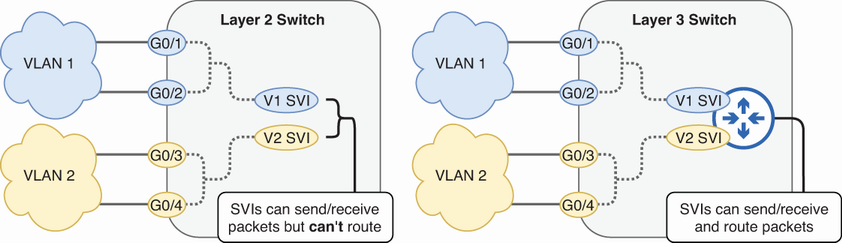
Compare the internal packet-handling roles of SVIs on Layer 2 and multilayer switches. section 5.2.1

