A database table stores related information in rows and columns. Each row is one record, such as a user or a haiku; each column describes an attribute of that record. Unlike an in-memory pandas dataframe, a database keeps its data after the program stops. section 8.2.1
Start with what the app needs to remember. A haiku app needs users and the haikus they write, so it can use a users table and a haikus table. A schema specifies each table’s columns and data types. A primary key uniquely identifies a row; a foreign key connects a row to another table. section 8.2.2 section 8.2.1
Figure 8.4 Database schema with a foreign key relationship between the users and haikus tables
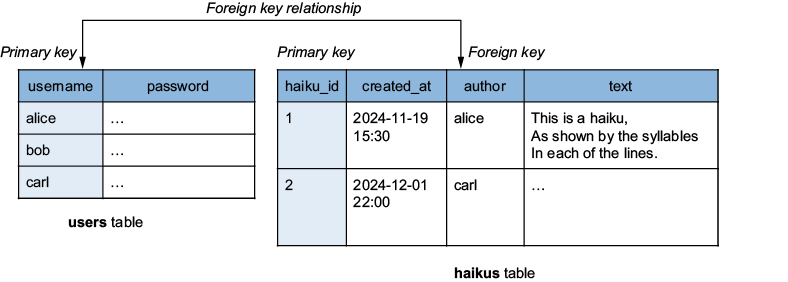
The schema diagram shows two tables and the foreign key that connects each haiku’s author to a user. section 8.2.2
Create a table in PostgreSQL
In a connected psql session, run `CREATE TABLE users (username VARCHAR(100) PRIMARY KEY, password_hash VARCHAR(128));`. This creates two columns and makes username the row’s unique identifier. `VARCHAR(100)` limits the length of a username; PostgreSQL rejects a longer value. Run `\dt` to check that the table exists. section 8.2.4
SQL also lets an app work with the rows inside a table. `INSERT` adds a record; `SELECT` retrieves records or chosen columns; `UPDATE` changes records; and `DELETE` removes them. For example, a query can select haikus whose author is a particular user and whose text contains “fox.” `DROP TABLE` removes the table itself, rather than just one row. section 8.2.4
Tables need not begin with a SQL command. To put sales data in BigQuery, create a dataset inside a project, create a table from a local CSV file, and choose schema auto-detection. The table then appears under the dataset, where its Preview tab lets you inspect the uploaded data. section 7.7.1











