A command-line interface (CLI) lets an AI agent interact with an environment by issuing commands through a shell. Unlike schema-driven function calling, it exposes a general-purpose command surface rather than requiring a predefined schema for each capability. section 4.3
A CLI tool loop connects command execution to the agent’s context:
- The agent sends a command to a shell such as Bash. section 4.3
- A sandbox contains execution, while a command policy can pause actions for human approval. section 4.3
- The harness returns command output and errors to the model, which uses the results to choose its next step. section 4.3
Bug-fixing loop
An agent runs tests, examines the error output, modifies a source file, then reruns the tests to check the fix. section 4.3
Figure 4.3 CLI workflow: an AI agent using a Bash tool to execute commands in a sandboxed shell and incorporate the command output into its response
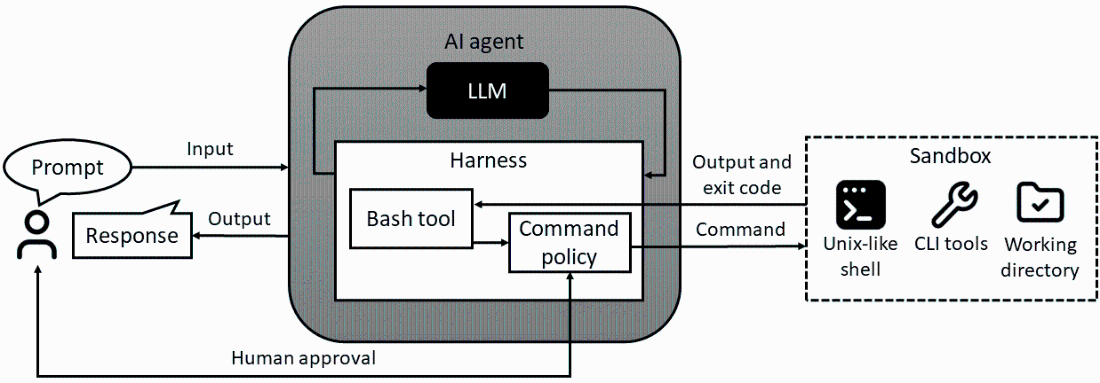
Trace how a Bash command passes through a sandboxed shell and how its output returns to the agent. section 4.3