A test case defines inputs, conditions, and expected outcomes for evaluating a particular software behavior. It can support manual or automated testing, but its value depends on context, specificity, and the risks it addresses. section 3.3.1 section 5.4
Useful test cases connect a focused behavior to observable results:
- State the behavior or feature being evaluated. section 5.4
- Specify relevant inputs or conditions, such as file format, file size, user speed, or concurrent users. section 3.3.1 section 5.4
- Define the expected outcome and check whether the case addresses an identified risk rather than merely adding coverage. section 3.3.1 section 5.1.1
File upload
A valid JPG or PDF should upload successfully and display confirmation. An unsupported EXE or HTML file should produce an explanatory error. A file above the size limit should also be rejected with an appropriate message. section 3.3.1
Risk-focused booking-list cases
For a logged-in user viewing bookings before authorization expires, vary network or system speed and the number of concurrent users. Verify correct display without delay or errors, then remove repeated or risk-unrelated cases. section 5.4
Figure 5.2 Area of the effect model demonstrating the core roles of the human and the LLM as an assistant
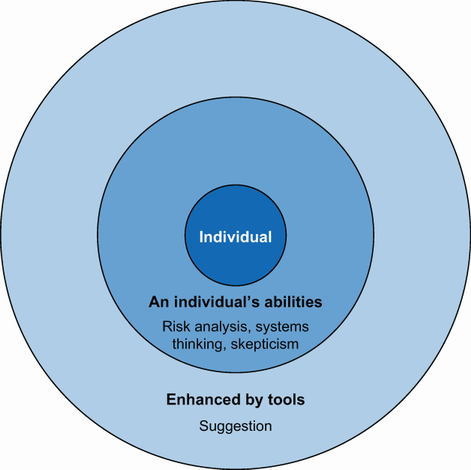
Use the area-of-effect model to keep human testers in control of feature focus and identified risks while an LLM suggests additional risks or cases. section 5.1.1
Test cases provide useful structure, especially for automation, but they cannot replace complex human testing. Treat generated cases as suggestions, check them against risks, and avoid producing large repetitive suites without clear value. section 5.4.1