Transparency is a design requirement for understanding and inspecting a model’s decisions. A classifier can score well on numerical measures yet still be unsuitable if people cannot get an adequate explanation of its decisions or inspect how it works. Record the required level of transparency in user stories alongside performance, latency, cost, privacy, and production robustness. section 7.3.1
Carry the requirement through model selection and delivery:
- Compare functional performance with explainability. Deep networks may handle complex images, sound, or language, but are generally less transparent than association rules or decision trees. section 7.3.3
- If the selected model remains opaque, decide what users can inspect in the interface. Output visualizations or post hoc explanations may help people evaluate predictions, but they do not make the underlying model transparent. section 9.4.3
- Make capabilities and limitations clear, show relevant information during use, and provide ways to correct outputs and leave feedback. section 9.4.3
Inspecting an opaque prediction
AlphaFold 2 uses complex deep networks that are not interpretable. Rendered protein structures, comparisons with earlier hypothesized structures, and views of how the structures function give scientists ways to assess its black-box predictions. For some deep-network inferences, activation maps can instead highlight image regions associated with high network activity; LIME supports this style of post hoc explanation. Such explanations warrant scrutiny rather than being treated as equivalent to a transparent model. section 9.4.3
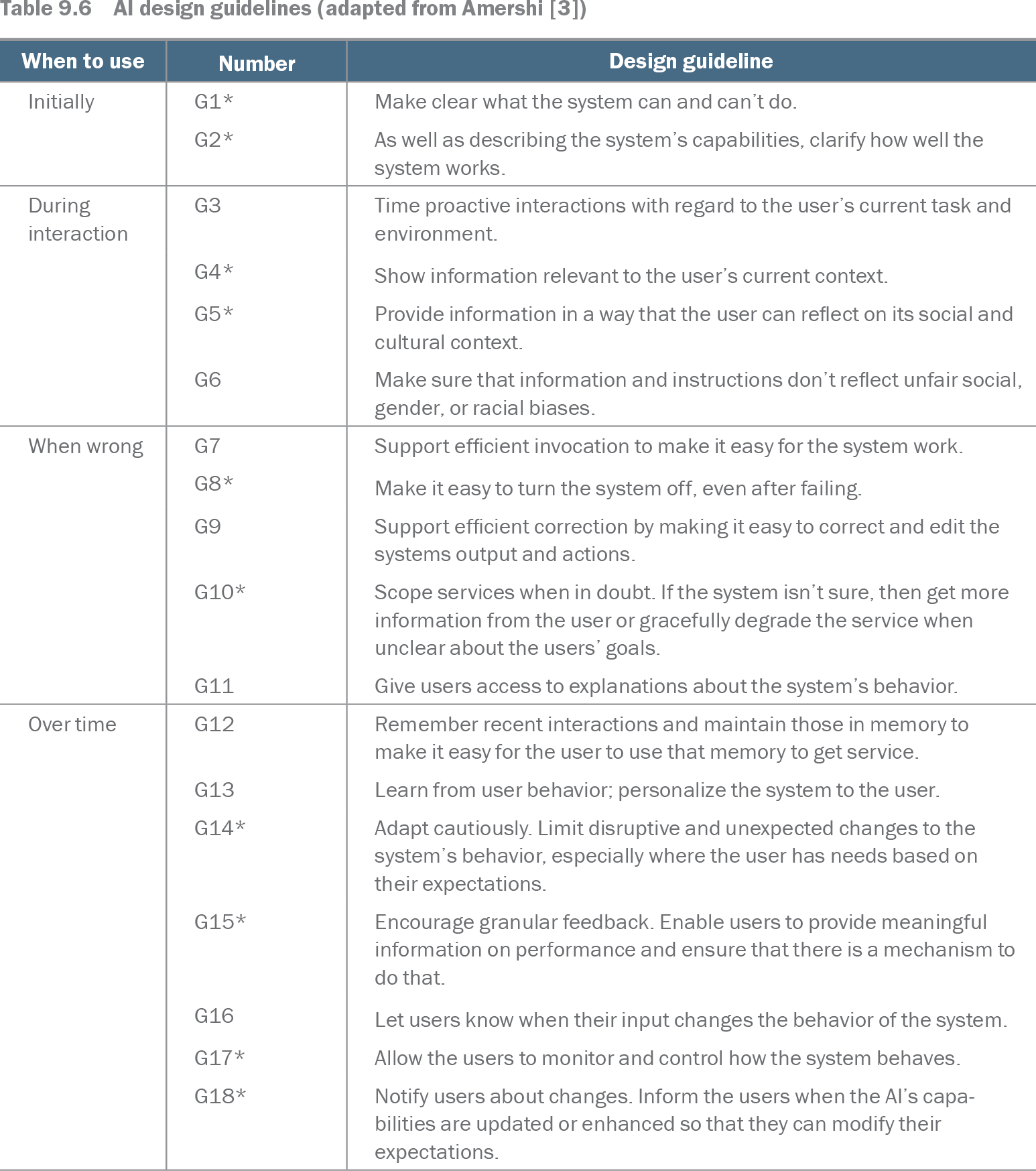
Table 9.6 AI design guidelines (adapted from Amershi [3]) (view table figure)
| Number |
Design guideline |
|
|---|---|---|
| Initially |
G1* |
Make clear what the system can and can’t do. |
| G2* |
As well as describing the system’s capabilities, clarify how well the system works. |
|
| During interaction |
G3 |
Time proactive interactions with regard to the user’s current task and environment. |
| G4* |
Show information relevant to the user’s current context. |
|
| G5* |
Provide information in a way that the user can reflect on its social and cultural context. |
|
| G6 |
Make sure that information and instructions don’t reflect unfair social, gender, or racial biases. |
|
| When wrong |
G7 |
Support efficient invocation to make it easy for the system work. |
| G8* |
Make it easy to turn the system off, even after failing. |
|
| G9 |
Support efficient correction by making it easy to correct and edit the systems output and actions. |
|
| G10* |
Scope services when in doubt. If the system isn’t sure, then get more information from the user or gracefully degrade the service when unclear about the users’ goals. |
|
| G11 |
Give users access to explanations about the system’s behavior. |
|
| Over time |
G12 |
Remember recent interactions and maintain those in memory to make it easy for the user to use that memory to get service. |
| G13 |
Learn from user behavior; personalize the system to the user. |
|
| G14* |
Adapt cautiously. Limit disruptive and unexpected changes to the system’s behavior, especially where the user has needs based on their expectations. |
|
| G15* |
Encourage granular feedback. Enable users to provide meaningful information on performance and ensure that there is a mechanism to do that. |
|
| G16 |
Let users know when their input changes the behavior of the system. |
|
| G17* |
Allow the users to monitor and control how the system behaves. |
|
| G18* |
Notify users about changes. Inform the users when the AI’s capabilities are updated or enhanced so that they can modify their expectations. |
Use the interface-guideline table to check how capabilities, contextual information, correction, and feedback will be presented to users. section 9.4.3