Version control keeps code in a known, reliable location instead of treating a development server and its backups as the only recoverable copy. That distinction matters when a change introduces a bug, a server fails, or a team must establish which definition should be deployed. section 7.6 section 7.6.1
For database work, Git provides shared version history while allowing developers to work on the same project areas in parallel. Files are not locked, so conflicting edits can occur, but they can be managed; a bad change can be rolled back from history. section 7.6.1
Mistake: relying on weekly backups
MagicChoc stores code only on its development instance, backed up weekly, then sends complex hand-written deployment scripts to a DBA. If the required object definition is unavailable or a deployment encounters an environment-specific problem, recovery and diagnosis become much harder than retrieving a tracked version. section 7.6 section 7.6.1
A safer working pattern is:
- Create a Git repository for the database project and choose its local path, ignored files, and GitHub destination. section 7.6.1
- Create a code branch, make and commit changes there, then merge approved work into main or master. section 7.6.1
- Use the repository as the handoff point for pull requests, builds, tests, and later deployment stages. section 7.6.2
Figure 7.7 Creating and configuring a repo in GitHub
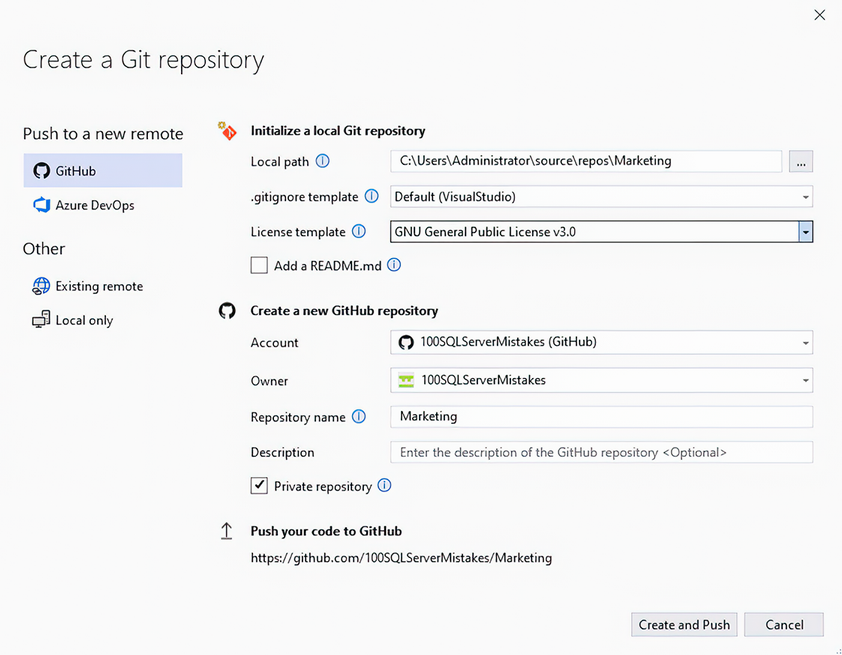
Use the repository-creation dialog to see the practical choices involved in initializing a Git repository and connecting it to GitHub. section 7.6.1
























