A bar chart represents quantities with rectangular bars: longer or taller bars mean larger values. Because the marks share a common alignment and unit, differences in length are quick to see. It is especially effective on a linear scale, where the visual size of a bar tracks the quantity directly. section 2.1.2
Use bars first for discrete categories: fruit types, survey responses, generations, or hours treated as separate buckets. A line implies that neighboring positions are connected and that omitted values can be mentally filled in; categories usually do not make that promise. For a continuous dimension, such as values over time, a line chart may better communicate the relationship. section 3.4.1 section 3.6
Commuting patterns at a glance
A horizontal bar chart of weekday rentals by hour makes the daily shape visible: rentals rise sharply into the morning commute, while evening rides taper more gradually. The table contains the same values, but bars make the pattern easier to pick out before reading every number. section 2.1.2
Keep a bar chart useful rather than merely familiar:
- Match it to discrete dimensions whenever categories, rather than a continuous progression, are being compared. section 3.4.1
- Use its simplicity for readable comparisons, but do not assume it is a one-graph-fits-all answer. section 6.2
- Avoid packing a dashboard with many bar charts and metrics when the result becomes crowded and busy; test layouts with sketches or wireframes and consider other views. section 8.3.3
- For interactive exploration, pair bars with clear controls and guidance when readers may be unfamiliar with interactive reports. section 7.2.2
Figure 3.1 The fruit data shown as a line on the left just doesn’t work because the fruits aren’t continuous, nor could one approximate them as such. On the right, the viz works much better as a bar chart.
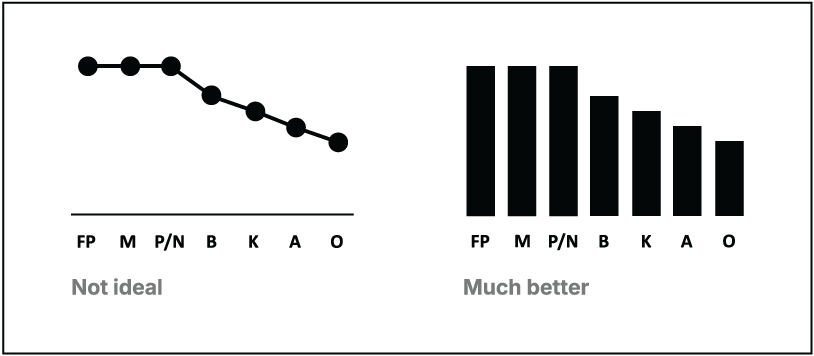
Compare a line and bars for the same fruit categories to see why disconnected categories are more naturally read as bars. section 3.4.1








