A bounding box localizes a region in an image as a rectangle defined by coordinates. In receipt-forgery labels, each forgery region has a box and a field name, such as total amount. Genuine receipts have no forgery regions. Drawing the boxes over an image makes the labeled areas visible and gives a detection system a spatial target rather than only a receipt-level forged/genuine label. section 6.1
Figure 6.6 An image of a forged receipt from the receipt forgery dataset (on the left), with bounding boxes drawn to indicate the forgery regions inside the receipt image. On the right, is the forgery label for this receipt image showing the location and dimensions of different forgery regions as rectangles or bounding boxes.
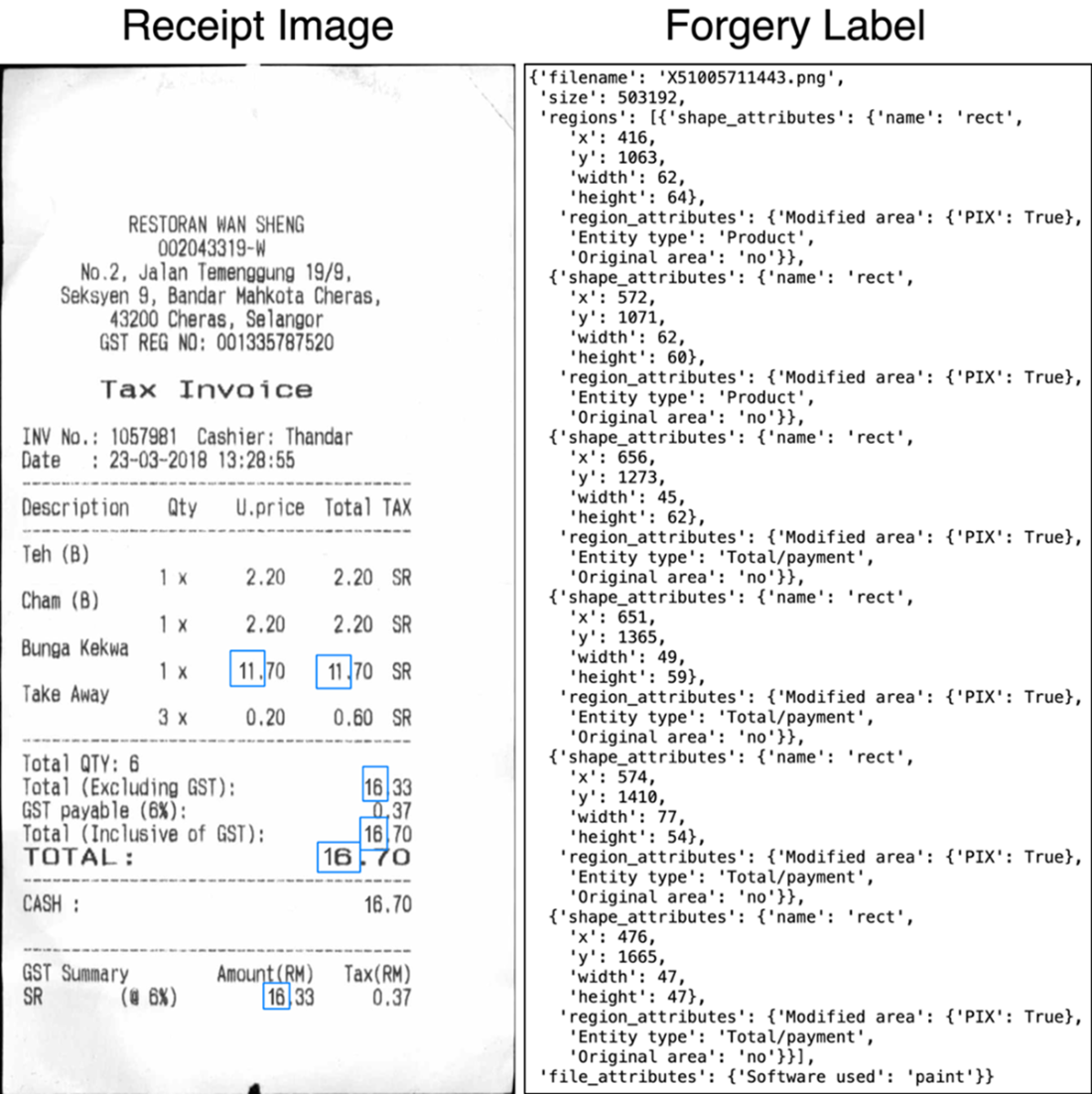
The image-label pair shows forgery regions as rectangles over a receipt and as location-and-dimension entries in its annotation. section 6.1
Bounding boxes can be converted into a segmentation mask for training. Start with an image-sized mask of zeros, then fill every pixel inside each forgery rectangle with 1. The resulting target marks forged pixels in white and all remaining pixels in black. A dataset item pairs the receipt image with this mask, allowing a segmentation model to learn pixel-level forgery predictions. section 6.3.1
Creating a forgery mask
For each annotation, read x, y, width, and height, then draw the rectangle from (x, y) to (x + width, y + height) into an initially empty mask. Preserve the original image shape before resizing both image and mask for model input. Using a configurable class count leaves room to add labels beyond forged and genuine. section 6.3.1
Boxes also support inspection after inference. Resize the model’s per-pixel forgery probabilities back to the receipt’s original dimensions, overlay them as a heatmap, and compare the heatmap with ground-truth boxes. Weak overlap on unseen receipts can reveal overfitting, including predictions repeatedly concentrated around price sections or receipt notes. section 6.3.5
An expert text-detection model can generate auxiliary bounding boxes without manually labeling every text field. It thresholds a text-probability heatmap, groups neighboring text pixels into contours, converts each contour to a rectangle, and retains boxes whose mean heatmap score meets the threshold. These text boxes can become an additional segmentation class alongside forgery boxes. section 6.4.2
Text boxes from an expert model
A text detector returns entries such as ((x0, y0, x1, y1), "text", score). Its boxes may be expanded before use, then drawn into a mask as text; manually supplied forgery boxes can be drawn afterward as a separate class. This produces a multi-task target that distinguishes background, text, and forgery. section 6.4.2