A context window is the maximum tokenized input and generated context a language model can process together. It contains the information available when the model predicts the next token: system instructions, user messages, conversation history, tool results, and retrieved documents. Context therefore acts as the model’s working memory, while prompts form only one part of it. section 1.5
More capacity does not automatically produce better responses. As context grows, performance can degrade: important details may be buried, attention may disperse, and information placed in the middle can be missed. Effective context design therefore selects highly relevant information instead of filling the window with everything available. section 1.5.3
Context-window pressure appears operationally in several ways:
- Long system prompts can cause the model to miss the task’s essential instructions. section 9.1
- Large tool inventories make tool selection harder and increase incorrect selections. section 9.1
- Multi-agent systems reduce pressure by assigning each specialist a short role-specific prompt and only the tools it needs. section 9.1
Technical blog-writing assistant
A single assistant may receive instructions for research, coding, drafting, review, and many tools at once. Splitting the work among Researcher, Coder, Writer, and Reviewer agents gives each role focused instructions and a smaller tool set, helping the model concentrate on its assigned task. section 9.1
Figure 1.6 Even with large context windows, longer inputs can degrade model performance. (Source: https://research.trychroma.com/context-rot)
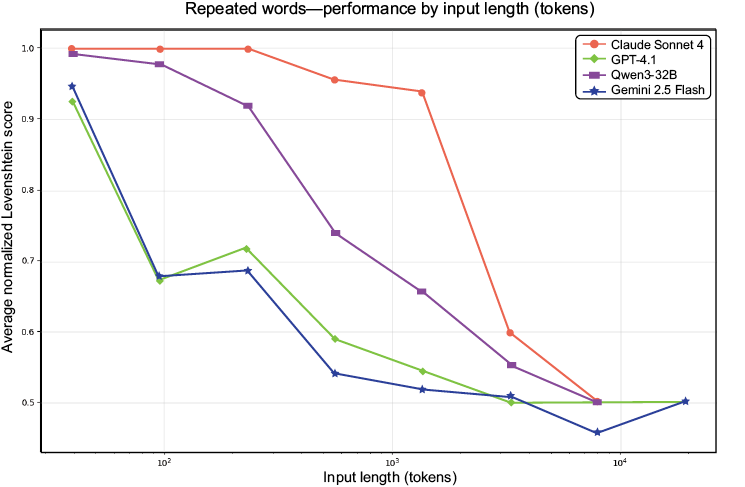
Use the figure to inspect how model performance can decline as context length increases, even when the available window is large. section 1.5.3





















