A long document or an extended chat can outgrow what an LLM can receive at once. The context window is the model’s maximum prompt size: the text supplied in one prompt, including instructions and context. Models have different limits, measured in tokens, which are often parts of words. section 3.1
When the available text will not fit, choose what the model needs:
- For document summarization, split the text into token-sized chunks, summarize each chunk, then summarize those results. TokenTextSplitter can help control chunk size. section 3.1
- For a continuing chat, compress or summarize earlier turns to preserve useful memory while staying within the limit and managing cost. section 1.1.2
- For knowledge-base Q&A, retrieve the content relevant to the question instead of putting every company document in the prompt. Focused context can improve speed, cost-efficiency, and accuracy. section 6.1.2
Figure 3.1 Summarizing a document bigger than the LLM’s context window involves splitting the document into smaller chunks, summarizing each chunk, and then summarizing the combined chunk summaries.
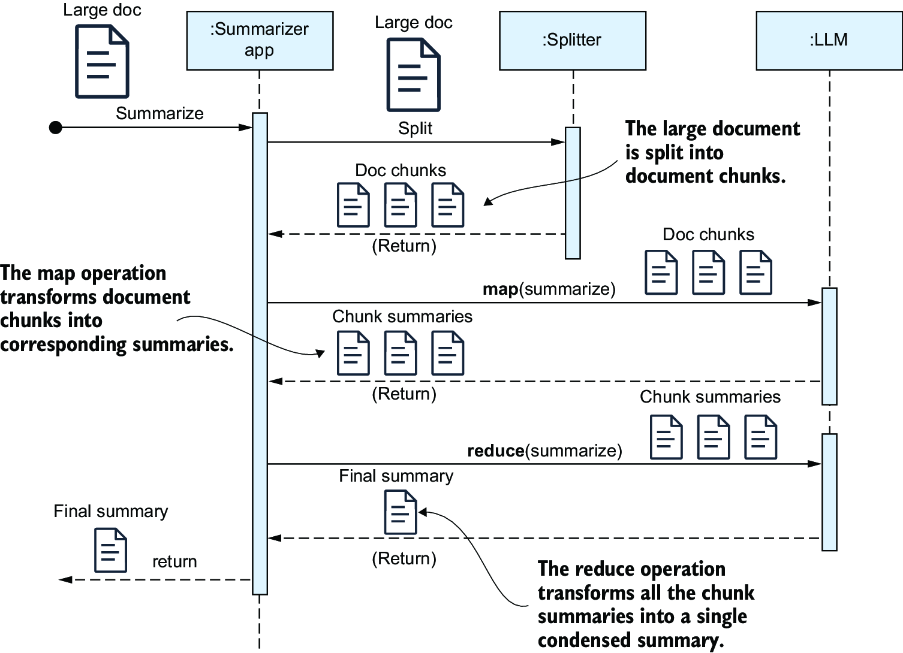
The diagram shows the staged path for a document that exceeds the context window: split it, summarize the chunks, then summarize their combined results. section 3.1
A larger window admits longer prompts and documents, but can increase cost and processing overhead. Choose a model and a context-management approach that fit the application rather than assuming the largest window is always best. section 1.5





















