Data cleaning detects, corrects, removes, or transforms inaccurate, incomplete, and inconsistent data so analysis becomes more accurate. Human entry, broken sensors, missing records, and system failures can all create problems. section 5.0
Common cleaning tasks include:
- Renaming columns or indexes, removing irrelevant or repeated rows, and excluding non-data rows. section 5.0
- Measuring missing values with count, isnull, notnull, info, or shape-based calculations. section 5.0
- Removing, replacing, or interpolating NaN values while considering how much data the operation discards. section 5.0 section 5.17
- Standardizing strings, fixing typos, removing whitespace, correcting column types, and identifying outliers. section 5.0
Parking-ticket cleanup
Load selected columns from a New York City parking-violations CSV, count the original rows, and remove rows containing missing values. Then compare narrower rules: require non-null license plate, state, vehicle make, and street name, or require only the fields most important for identifying a ticket. Translate each remaining row count into potential lost revenue at $100 per ticket. section 5.1
Effective cleaning depends on judgment, not just methods. A null value may be acceptable in one column but decisive in another; a non-null value such as BLANKPLATE may also need conversion to NaN before analysis. section 5.17 section 5.4
Cleaning before changing types
When passenger_count and payment_type contain NaN values, read them temporarily as floats, use dropna to remove affected rows, then convert the cleaned columns to int8. Explicit dtypes also prevent inconsistent chunk inference from producing object columns. section 3.10
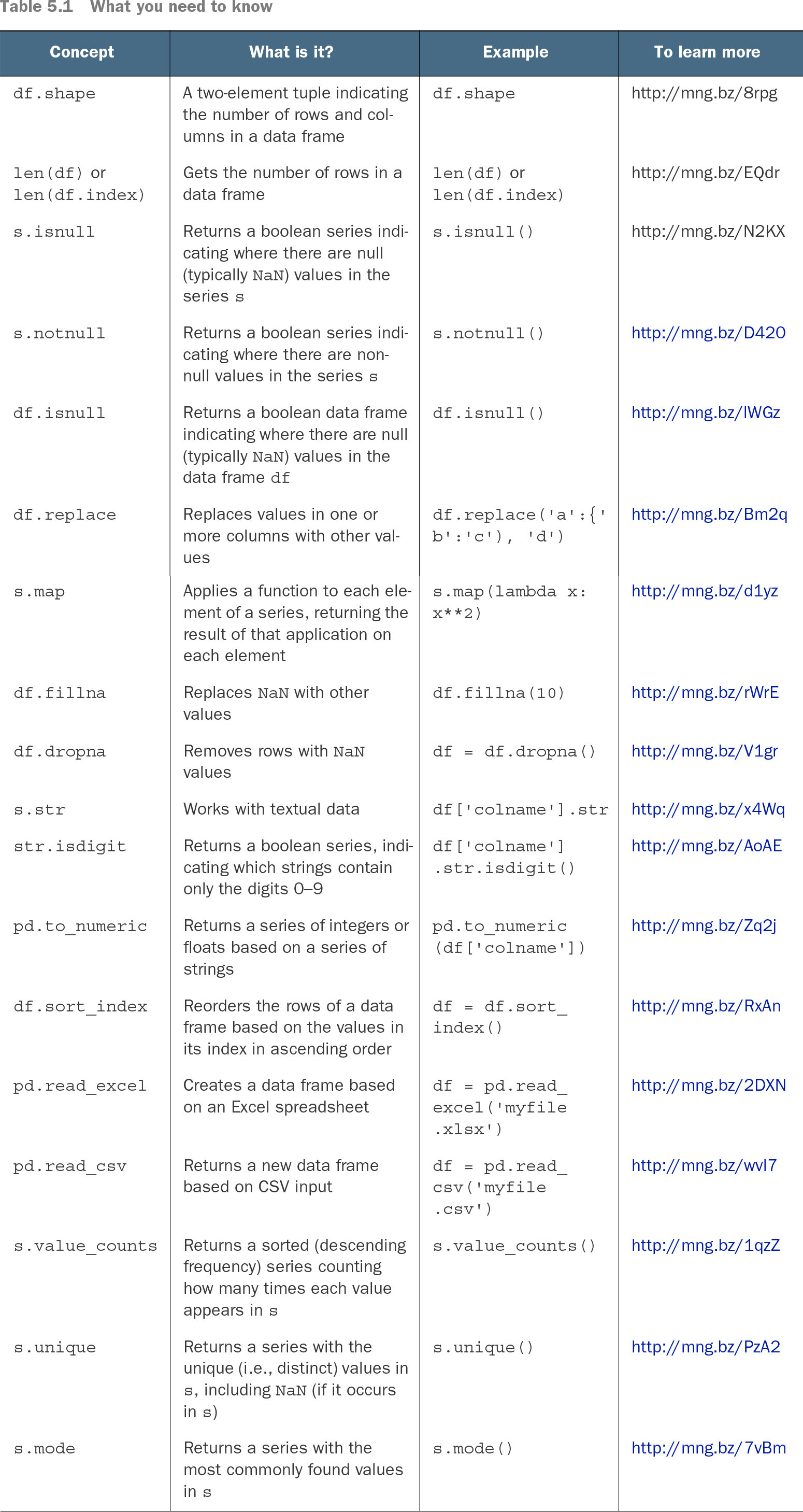
| Concept |
What is it? |
Example |
To learn more |
| df.shape |
A two-element tuple indicating the number of rows and columns in a data frame |
df.shape |
http://mng.bz/8rpg |
| len(df) or len(df.index) |
Gets the number of rows in a data frame |
len(df) or len(df.index) |
http://mng.bz/EQdr |
| s.isnull |
Returns a boolean series indicating where there are null (typically NaN) values in the series s |
s.isnull() |
http://mng.bz/N2KX |
| s.notnull |
Returns a boolean series indicating where there are non-null values in the series s |
s.notnull() |
http://mng.bz/D420 |
| df.isnull |
Returns a boolean data frame indicating where there are null (typically NaN) values in the data frame df |
df.isnull() |
http://mng.bz/lWGz |
| df.replace |
Replaces values in one or more columns with other values |
df.replace('a':{'b':'c'), 'd') |
http://mng.bz/Bm2q |
| s.map |
Applies a function to each element of a series, returning the result of that application on each element |
s.map(lambda x: x**2) |
http://mng.bz/d1yz |
| df.fillna |
Replaces NaN with other values |
df.fillna(10) |
http://mng.bz/rWrE |
| df.dropna |
Removes rows with NaN values |
df = df.dropna() |
http://mng.bz/V1gr |
| s.str |
Works with textual data |
df['colname'].str |
http://mng.bz/x4Wq |
| str.isdigit |
Returns a boolean series, indicating which strings contain only the digits 0–9 |
df['colname'].str.isdigit() |
http://mng.bz/AoAE |
| pd.to_numeric |
Returns a series of integers or floats based on a series of strings |
pd.to_numeric(df['colname']) |
http://mng.bz/Zq2j |
| df.sort_index |
Reorders the rows of a data frame based on the values in its index in ascending order |
df = df.sort_index() |
http://mng.bz/RxAn |
| pd.read_excel |
Creates a data frame based on an Excel spreadsheet |
df = pd.read_excel('myfile.xlsx') |
http://mng.bz/2DXN |
| pd.read_csv |
Returns a new data frame based on CSV input |
df = pd.read_csv('myfile.csv') |
http://mng.bz/wvl7 |
| s.value_counts |
Returns a sorted (descending frequency) series counting how many times each value appears in s |
s.value_counts() |
http://mng.bz/1qzZ |
| s.unique |
Returns a series with the unique (i.e., distinct) values in s, including NaN (if it occurs in s) |
s.unique() |
http://mng.bz/PzA2 |
| s.mode |
Returns a series with the most commonly found values in s |
s.mode() |
http://mng.bz/7vBm |
Use the reference table to review compact pandas operations for dimensions, null detection, replacement, and related cleaning work. section 5.0