Feedback is the signal created when people evaluate AI-generated code. Reviewing, accepting, rejecting, or rating a suggestion tells the coding assistant whether its output was useful and helps shape later suggestions. section 1.3 section 2.1
A practical feedback loop combines several actions:
- Inspect the generated result and the files it changes. section 10.5.1
- Accept useful edits or reject suggestions that do not fit the task. section 2.1
- Use thumbs-up or thumbs-down controls when the tool provides them. section 10.5.1
Reviewing a generated file
After an AI assistant creates or edits river_run.py, inspect the proposed changes and the changed-file list. Keep the result only if it fits the task, then optionally submit a thumbs-up or thumbs-down rating. Copy the result when Markdown output is the needed artifact. section 10.5.1
Figure 1.1 Integrated tools use a sophisticated system to generate code. The process starts with your prompt, and the assistant gathers up documentation and source code to see whether your answer can come from these sources. It makes a best guess at what you’re looking for and generates a response. Your acceptance of these responses helps train the assistant in the future (unless you’ve blocked feedback).
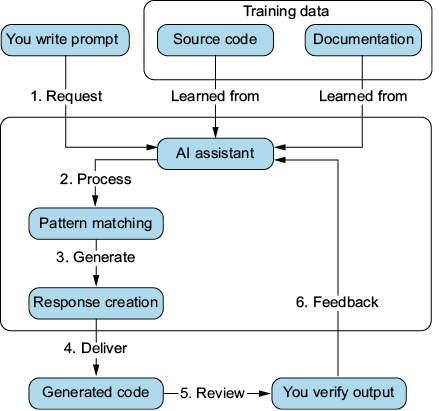
The diagram connects a prompt, gathered documentation and source code, generated output, and acceptance feedback that can help train the assistant. section 1.3