Feedback is information that helps people understand either what a product learned from them or what the product is doing in response to them. It works at two levels: teams gather feedback to improve a design, while interfaces give feedback so people can continue a task with confidence. Both reduce guesswork and keep attention on user needs. section 3.4.1 section 7.2.2
Treat feedback as part of an ongoing cycle, not a final approval step. Identify the audience and their goals, create a design solution, test it with users, and use what you learn to revise the work. New needs or recurring problems can begin another research, design, testing, and development cycle. section 3.4.1 section 4.2.4
Figure 3.4 The user-centered design process starts with identifying a user need you are trying to solve and then moves on to how users are going to utilize what you provide, identifying the requirements needed to solve the use case, building a design solution, and evaluating whether the design fulfills the user’s need. If the process does not satisfy the user’s need, it restarts.
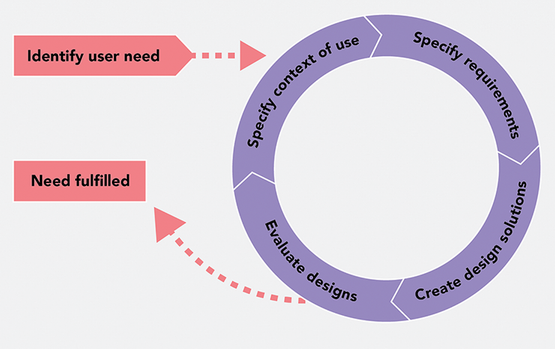
Use the cycle to place feedback after evaluating a solution and before the next design decision; restart when the solution does not meet the user need. section 3.4.1
Gather useful feedback early and turn it into decisions:
- Test once the design meets its initial requirements and an MVP has approval; do not wait for a design to feel perfect. section 11.1.3
- Decide what feedback should address. Interviews can probe visual reactions, hierarchy, navigation, user flows, and whether people can reach a primary call to action. section 11.2.1
- Use an interview script when focused questions are needed, or ask people to walk through a task and follow up on the choices they make. Keep detailed notes or record with permission. section 11.2.1
- Look for repeated themes rather than acting on a single personal preference. Prioritize patterns that show visual choices are hindering the user experience. section 11.3
- Use production analytics to locate where people encounter trouble in a task flow, then use interviews to investigate why. section 11.3
Test before a costly launch
Imagine building a web application without research and showing it to users only just before launch. If their feedback contradicts the assumed needs or reveals navigation problems, substantial redesign and rebuilding can delay launch and raise costs. Earlier research gives the team a chance to correct direction before that rework accumulates. section 4.1.1
Interface feedback should make an interaction, its result, and its current status visible. A hover color change, input response, or animated outline can signal that an element is interactive. A failed login can pair an error message with a brief shake so the problem is noticed immediately rather than discovered by scanning the form. section 7.2.2
Status feedback is especially important when results are not immediate. Loading indicators, skeleton content, and progress bars show that work is underway. After a payment submission, for example, a loading state followed by a success or error message helps prevent people from refreshing or starting over because they think nothing happened. section 7.2.4