A color palette, or color scheme, is a selected set of colors used together in an interface. It is more than decoration: color shapes mood, perceived professionalism, visual hierarchy, and what people notice first. A palette that feels unbalanced, overly intense, or full of clashing colors can distract from a product’s message and make the next action unclear. section 9.0 section 9.2.2 section 9.3
Start with a color relationship from the color wheel rather than picking unrelated swatches. Monochromatic palettes use shades and hues from one color family and can make a busy interface feel simpler and more harmonious. Complementary colors sit opposite each other and create strong contrast; use them carefully, with a neutral such as black, white, or gray, and decide which color leads and which acts as an accent. Analogous, triad, and split-complementary relationships offer other structured starting points. section 9.2.1 section 9.9
Build and apply a palette in a deliberate order:
- Choose one base color to appear most often across the interface. section 9.4
- Add one or two accent colors for emphasis, then derive tints and shades from the selected swatches. section 9.4
- Create a neutral gray palette; grays can retain a hint of the primary color to make the interface feel cohesive. section 9.4
- Use 60/30/10 as a starting ratio when color amounts do not feel balanced, then adjust by studying the actual screen. section 9.2.2 section 9.4
- Reserve the strongest or most vibrant color for focal points such as a main headline, primary call to action, or selected control. section 9.5
Travel landing page palette
A muted blue can serve as the primary brand color, with lighter blue tones separating sections and a muted golden yellow as the accent. Apply the blue to the header and footer, then use gold on a search button, cards, and other actions that should pull attention down the page. When imagery already supplies visual richness, avoid filling every section background with full-strength palette colors; the result can become muddy. The palette then supports hierarchy instead of competing with content. section 10.7 section 9.5
A palette must also work for readable, usable communication. Check text contrast with a contrast tester, especially where text sits on images or colored backgrounds. Do not rely on color alone to convey meaning: pair it with labels, icons, or other context. Color can direct attention, but excessive contrast can overwhelm people while insufficient contrast can leave actions unnoticed. section 9.9 section 9.2.2 section 9.5
Palette skill improves through observation and practice. Save an interface you like, sample its colors in a design tool, reconstruct its palette, and identify its color relationship, shades, tints, saturation, and approximate proportions. The goal is not to copy every value exactly, but to see how color is distributed and how it guides attention. section 9.2.2
Figure 10.13 After defining our color palette, we can use our palette to bring more hierarchy to the page. The gold accent color highlights the areas we want users to focus on and draws them down the page.
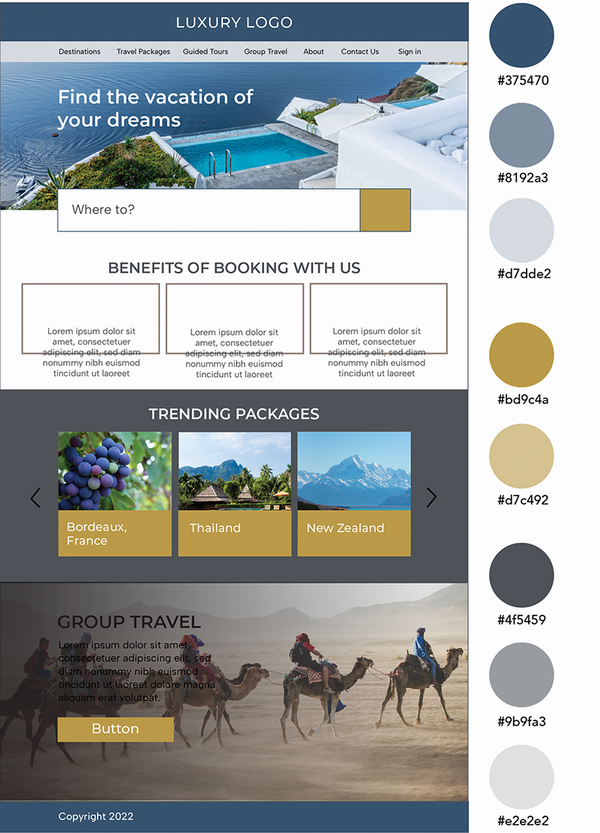
Compare the muted blue base and gold accent to see how limited color use creates page hierarchy and directs attention toward key actions. section 10.7










