A color palette is a coordinated selection of colors used together in a visual design. Choose colors to support a page’s mood, readability, and visual emphasis rather than letting every element shout at once. section 5.4 section 17.6
Common ways to organize a palette include:
- Complementary colors sit opposite each other on the color wheel; use one as the main hue and the other as an accent. section 17.6
- Analogous colors sit beside one another and create lower-contrast combinations for a closely related appearance. section 17.6
- Triadic colors are evenly spaced around the color wheel, while split complementary palettes combine an opposite hue with two nearby accents. section 17.7
- Monochrome palettes keep one hue while varying saturation and lightness, producing five related colors. section 17.7
A practical three-color palette
For a photo gallery, use one color for the header and footer, a plain dark color for the main background, and an off-white or subdued yellow for readable text. For a warmer portfolio, a monochrome palette based on #77613c can suggest warmth and security. section 15.5 section 20.4
Figure 17.11 Use the Web Design Playground’s Color Scheme Calculator to generate a color scheme for a given RGB code.
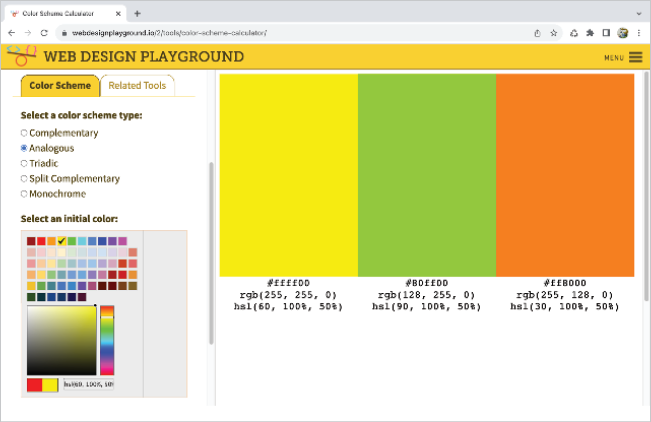
Generate a palette from a starting color with the Color Scheme Calculator, which displays RGB, rgb(), and hsl() values for each result. section 17.7










