A color palette is a small, coordinated set of colors for a page. Think of it like choosing a few paints before making a poster: the colors should support one another and help the page say what you want it to say. Two or three colors are usually enough; a pile of unrelated hues can confuse visitors or cause eye fatigue. section 17.15
Give each color a job so the design stays lively without becoming noisy:
- Use an accent color for elements that must be noticed, such as call-to-action buttons or important text. Make it bold and unmistakable. section 10.4 section 17.15
- Use a secondary color for important content bands. It can be bold, but should not clash with or overshadow the accent. section 10.4
- Use a tertiary color for less important content, keeping the visual hierarchy clear. section 10.4
- For image-heavy pages, keep the main background plain or dark so thumbnails stand out, then use readable light text across the page. section 15.5
Start with the mood. Cool colors such as blue and gray can suggest dependability and trust; warm red, yellow, and orange can feel festive and fun. Brown and yellow can feel safe and comfortable, while green and brown can add an environmental touch. section 17.15 section 20.4
Build from one color
Pick a starting color, then let it lead. A split complementary scheme can grow from #ffc200, while a monochrome scheme can grow from #77613c. If you want a stronger contrast pair, complementary hues sit opposite each other on the color wheel: red, hsl(0, 100%, 50%), complements cyan, hsl(180, 100%, 50%). Use one as the main hue and the other as an accent. section 5.4 section 17.15 section 20.4
Not sure where to begin? Enter an initial color into Palettable, keep compatible suggestions with Like, and try another with Dislike. Then choose the version that suits your own style and the page’s purpose. section 10.4
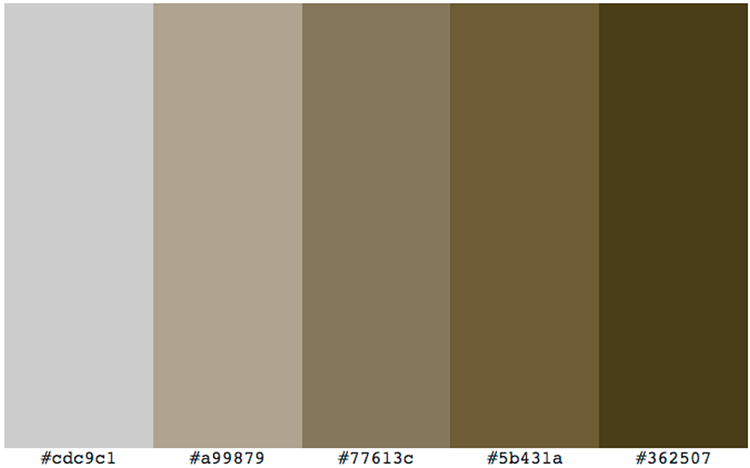
Compare a monochrome palette built from one rich brown starting color, then imagine where its shades could create warmth and security. section 20.4










