A color palette is a group of colors chosen to work together in a design. In data visualization, it is not decoration sprinkled on at the end: it helps distinguish data, support emphasis, and keep text, backgrounds, icons, and chart furniture working as one system. Start by making the visualization understandable in black and white; then add color where it has a clear job to do. section 4.0 section 4.3
Choose palette type to fit the data. Continuous palettes include sequential and diverging palettes, while categorical palettes serve distinct groups. A palette may appear across marks, labels, backgrounds, images, borders, axes, and ticks, but more color is not automatically more clarity. Poorly chosen color can overwhelm an otherwise effective visualization. section 4.3
Useful ways to create or refine a palette include:
- Use a color wheel to select balanced colors. Complementary colors sit opposite each other; split-complementary schemes use neighbors of the opposite color; analogous colors are adjacent; triadic schemes form an equilateral triangle. section 4.3.3
- Extract colors from a photograph or artwork, especially natural imagery, then adjust saturation and lightness while retaining the hues if needed. section 4.3.3
- Begin with existing brand colors and generate companion colors, then check the result with color-vision-deficiency simulations before committing to it. section 8.4.3
- Move between color spaces while editing: hex can make RGB values convenient to set, while HSB makes hue, brightness, and saturation intuitive to tweak. section 4.2.4
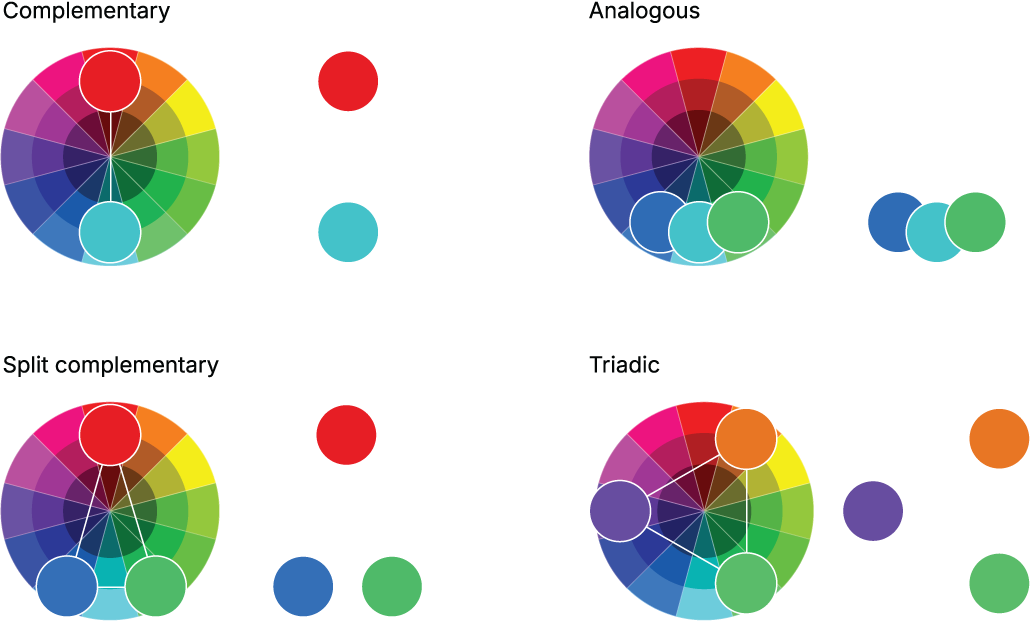
Compare common color-wheel schemes to see how complementary, split-complementary, analogous, and triadic selections distribute colors around the wheel. section 4.3.3
A dashboard palette with durable meanings
A hospitality dashboard starts with two logo colors, generates three companions, and checks the final set for color-blind friendliness. The two original colors identify the two most important metrics and keep those meanings everywhere in the dashboard. A lighter version of one logo color becomes the background, helping foreground information stand out in white space. section 8.4.3
Consistency matters as much as the individual swatches. When a color repeatedly means the same thing, readers do less relearning as they move through a display. Reserve strong colors for important distinctions, and use lighter or quieter colors to support hierarchy rather than compete with the data. section 8.4.3 section 4.3










