Optimization is an iterative development cycle: plan, build, get feedback, and repeat. Each pass turns what was learned in the previous one into a better next version, rather than treating research, design, and development as one-way handoffs. section 8.4
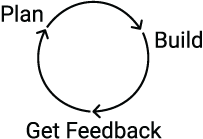
The cycle has three deliberately simple steps—plan, build, and get feedback—then loops back. Repetition is the feature, not a sign that something went wrong. section 8.4
Use the cycle at each stage of a visualization project:
- Plan by gathering questions and requirements, then confirm that they reflect stakeholder needs. section 8.4
- Build a tangible artifact: requirements document, wireframe, mockup, or development prototype. section 8.4
- Get feedback from stakeholders and users, then use it to revise the next plan rather than merely defend the current version. section 8.4
A dashboard improves before it looks finished
An early housekeeping dashboard felt unfinished, with problems such as limited space for calendar-view bar labels. Sharing it anyway surfaced ideas for a legend, better use of calendar and line-chart space, and more color and polish. Feedback converted an awkward draft into a clearer final version. section 8.4.2 section 8.4.2
Iteration needs a stopping rule. As changes become smaller and their combined effect no longer justifies the effort, diminishing returns suggest calling the work done. A deadline can impose the same boundary; near it, check the requirements document to verify that the visualization meets its agreed goals. section 8.4.2 section 8.4.2





























