A prompt that works on a few messages may still misclassify others, and manually revising it can become slow trial and error. In DSPy, optimization replaces much of that guesswork with a data-driven search: generate candidate prompts, evaluate them against a chosen metric on a validation dataset, and select a stronger candidate. Because not every possible prompt can be tested, the search explores a manageable set. section 1.1.2 section 5.0
A practical workflow is:
- Build a simple baseline application and evaluate it before trying to improve it. section 1.6
- Choose a metric and examples that reflect the task; use evaluation to compare candidates rather than relying on impressions. section 2.3 section 5.0
- Optimize the prompts used by the application, then evaluate the optimized version against the baseline. Workflows with multiple prompts can be optimized together. section 1.6 section 1.8
A prompt can be improved by changing its instructions or by selecting demonstrations—examples with their correct answers—to include in it. DSPy provides optimizers for demonstration selection, including LabeledFewShot, BootstrapFewShot, BootstrapFewShotWithRandomSearch, and KNN. Improving the prompt is one option alongside using a stronger, potentially more expensive language model or fine-tuning its weights. section 5.0 section 5.1
Airline intent classification
Suppose a classifier must assign messages to Flight, Booking, Time, or Date. Those short labels may not express every distinction needed to classify a message correctly. Labeled examples can supply the missing patterns: an optimizer selects a subset as prompt demonstrations, and the resulting classifier can be evaluated against the unoptimized baseline. In a separate illustrative customer-service classifier, three candidate prompts receive scores and the highest-scoring one is selected; that score illustrates the selection process, not a guaranteed improvement. section 5.1 section 5.0 section 1.1.2
Figure 5.2 Prompt optimization. The input to the optimizer is a set of examples with their labels. During optimization, the optimizer selects a subset of the examples to use as prompt demonstrations.
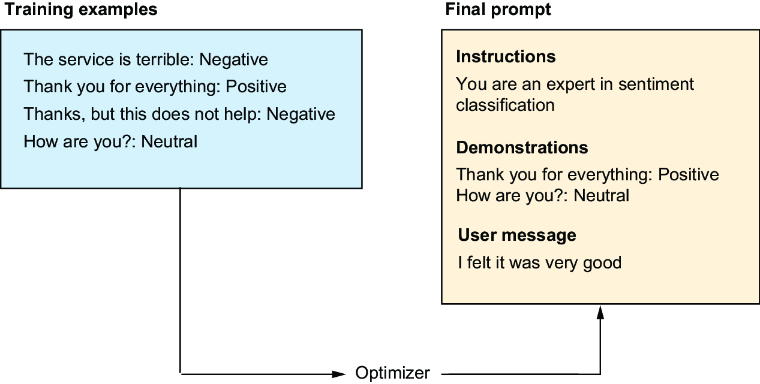
Shows labeled examples entering an optimizer and a selected subset becoming prompt demonstrations. section 5.1





























