Saturation is a color’s vividness or intensity. Higher saturation makes a color brighter and more attention-grabbing; lower saturation makes it duller and more faded. In HSL, saturation ranges from 0% to 100%. section 9.1.3 section 9.7.3
Use saturation deliberately in interfaces. Too many fully saturated colors can clash, overwhelm users, or compete with important content. Highly saturated colors work best when creating contrast and directing attention. section 9.1.3 section 9.9
Apply saturation while building a palette:
- Begin with a primary hue, then reduce saturation to create supporting colors; one palette uses 60% for a secondary color and 10% for a very light tone. section 9.5
- Reserve the most vibrant color for high-priority elements such as a headline, primary call to action, or checked control. section 9.5
- Pair vivid colors with restrained grays and lighter tones so secondary information does not compete with the main action. section 9.5
- Check text contrast when saturated colors appear behind or near text, and add icons or labels instead of relying on color alone. section 9.1.3 section 9.9
A travel landing page
A violet-blue primary color draws attention to the landing page headline, search button, and checked checkboxes. A 60%-saturation version colors the logo, while a 10%-saturation version provides a light background for secondary information and text. section 9.5
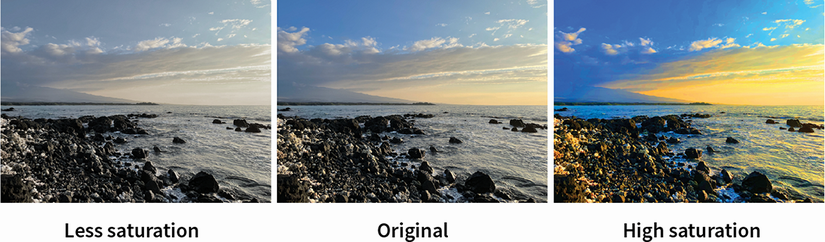
Compare a saturated image with a desaturated one to see how vividness changes visual emphasis. section 9.1.3






