Saturation is a hue’s purity: how much of the color is still color, rather than gray sneaking into the mix. It is written as a percentage. At 100%, the hue is pure; as the percentage falls, it looks grayer; at 0%, it becomes grayscale. section 17.1
Figure 17.3 Saturation is a measure of a color’s purity or how much gray is mixed in. The color wheel in Figure 17.2 is set to 100% saturation. The lower the saturation percentage, the grayer the color appears.
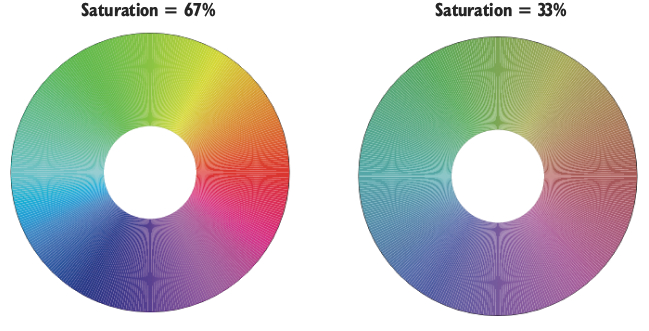
Use the color wheel to see the effect directly: lowering saturation drains gray into a hue without changing its position on the wheel. section 17.1
In CSS HSL notation, saturation is the middle value: hsl(hue, saturation, lightness). Hue selects a position on the color wheel, saturation controls purity, and lightness controls how dark or light the result is—three separate knobs, because colors enjoy making things complicated. section 17.1 section 17.4
A fully saturated purple heading
Use hsl(300, 100%, 25%) for purple text with full saturation and 25% lightness: h1 { color: hsl(300, 100%, 25%); } Keep the hue at 300 and lower 100% to make that purple less vivid and more gray. section 17.4 section 17.1
A color chooser can make the numbers less mysterious. Choose a color, then drag horizontally in the large color box to set saturation; the tool displays the resulting color along with HSL, RGB, hexadecimal, and related CSS forms. section 17.5
Saturation also helps when building a related palette:
- Use a monochrome scheme to keep one hue while varying saturation and lightness across five colors. section 17.7
- Use the Color Scheme Calculator to generate complementary, analogous, triadic, or split-complementary schemes and inspect each color’s HSL value. section 17.7






