liveBook · Manning

Saturation

As explained in Web Components in Action

Saturation is the color attribute describing the intensity or purity of a color.

Saturation describes how intense or pure a color appears. In a color picker, dragging horizontally adjusts saturation, while vertical movement adjusts brightness. section 11.1

A two-dimensional coordinate picker exposes saturation on the x axis and brightness on the y axis. A draggable thumbnail selects both values simultaneously, with position represented by x and y percentage attributes. section 11.2

A browser implementation handles the interaction through:

  • Mouse coordinates converted into horizontal and vertical positions. section 11.2
  • Clamping the thumbnail within the picker before updating x and y. section 11.2
  • A white-to-transparent horizontal gradient that exposes saturation over the selected background color. section 11.2
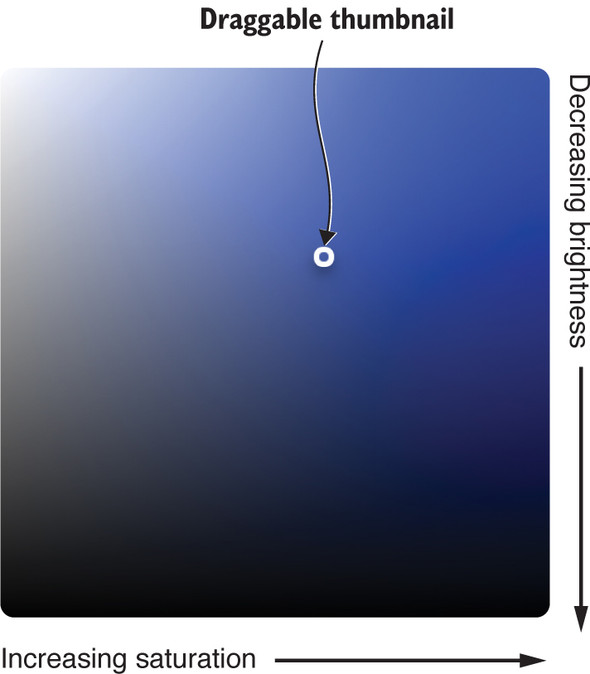
Figure 11.5. Saturation and brightness picker as a candidate for a web component

Shows the two-dimensional saturation and brightness picker used as the component’s visual model. section 11.1


How Web Components in Action covers it

How deep it goes
Explains saturation through coordinate mapping, dragging, boundary clamping, attributes, and gradient overlays.
Examples
Uses a draggable saturation-and-brightness picker with horizontal and vertical gradients.
What it assumes
Builds on slider interaction patterns while introducing two-axis coordinates, x and y attributes, and thumbnail positioning.
What you can do after
Builds a draggable saturation control as a coordinate-picker Web Component.
How it connects
Connects saturation with brightness, color pickers, coordinate pickers, and Web Components.

Also explained in

Compare how 7 books explain saturation →

Related concepts

This explainer was generated by Manning's knowledge graph from the text of Web Components in Action. The section links point to the parts of the book it draws on.




