Saturation controls how vivid a color feels. In HSL, it is the percentage of a hue’s purity: 100% is fully pure, while lowering the value mixes in gray. At 0%, the hue becomes grayscale. This makes saturation useful when a UI needs the same basic hue with either a bold accent or a restrained, pastel treatment. section 7.1.2
Figure 7.2 You can visualize the HSL color model as a cylinder.
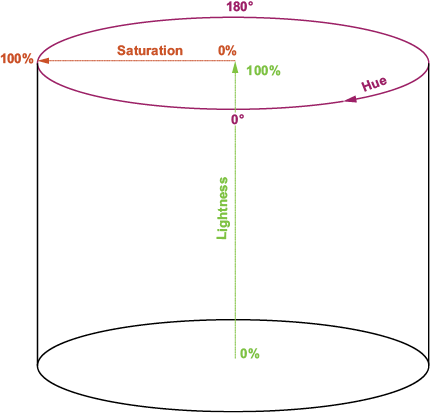
Picture HSL as a cylinder: hue travels around it, lightness moves vertically, and saturation measures the distance from the neutral center axis. Moving inward removes colorfulness without changing the hue position. section 7.1.2
In CSS, saturation is the middle percentage in hsl(). For example, hsl(300 100% 25%) produces a fully saturated dark purple. Keeping hue and lightness fixed while reducing the middle value gives a grayer version of that purple, which is a direct way to soften an accent without choosing a new color. section 7.1.2
When converting RGB to HSL, calculate saturation after normalizing the channels:
- Divide red, green, and blue by 255; find their maximum and minimum values, then calculate chroma as C = max − min. section 7.2.2
- Calculate lightness as L = (max + min) / 2. If chroma is zero, the color is grayscale, so saturation is zero. section 7.2.2
- Otherwise scale chroma relative to lightness: S = C / (1 − |2L − 1|), then express the result as a percentage. section 7.2.2
A purple RGB color becomes an HSL value
A conversion function can accept RGB values such as red 128, green 0, and blue 128, return h, s, and l, and build an hsl() string for a page background. The calculation separates the color’s hue, saturation, and lightness so each property can later be adjusted independently. section 7.2.2
The reverse conversion also treats zero saturation as a special case. If S is 0, HSL describes gray, so red, green, and blue all receive the same value derived from lightness. For chromatic colors, saturation participates with lightness in intermediate values that are then converted into RGB channels. section 7.2.3
Saturation is especially important when deriving dark-mode colors. Direct RGB inversion can turn muted light-mode colors garish and distort the contrast relationships among UI elements. A more deliberate transform keeps hue and saturation controlled while changing lightness and checking contrast. section 7.5.1 section 7.5
Softening a dark palette
Start from an HSL light-mode palette, invert lightness, shift hue slightly, and reduce saturation. A simple transform uses newS = s × 0.8, while broader guidance suggests reducing saturation by 10%–30% to create softer, more atmospheric dark-mode tones. Test each transformed foreground/background pair for contrast. section 7.5.4 section 7.5.3
Treat saturation as a relationship, not an isolated decoration. Accent colors need to retain their relative prominence, while text, backgrounds, and surfaces must remain readable and visually separated. Reducing saturation can improve mood, but it does not replace contrast-ratio testing. section 7.5 section 7.5.4






