Saturation tells you how pure a color feels. Imagine turning down the strength of a paint color: the more gray you mix in, the lower its saturation becomes. At 100 percent, the hue is fully pure; at 0 percent, it becomes grayscale. section 17.1
Read a saturation percentage like this:
- 100% keeps the hue fully pure and vivid. section 17.1
- Values below 100% mix increasing amounts of gray into the hue. section 17.1
- 0% removes the color from the hue, placing it in the grayscale. section 17.1
- Use saturation alongside hue, which chooses the color-wheel position, and luminance, which controls lightness or darkness. section 17.1
Try saturation in CSS
CSS places saturation between hue and luminance in the hsl() function: h1 { color: hsl(hue-value, sat-value, lum-value); }. Replace sat-value with a percentage from 0 to 100. For a vivid heading, choose a high percentage; for a softer, grayer heading, choose a lower one. section 17.6
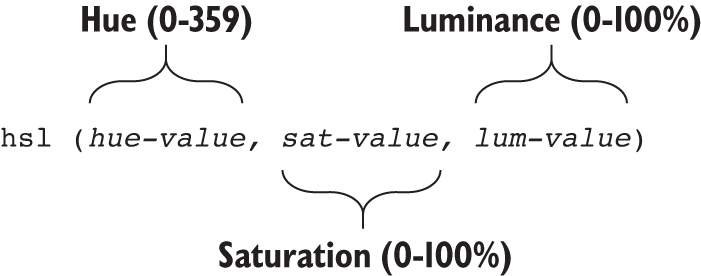
Use the hsl() figure as a quick visual guide to the positions of hue, saturation, and luminance in a CSS color value. section 17.6






