Saturation is the intensity or purity of a color relative to gray. At 0%, a hue becomes gray; at 100%, it becomes that hue’s fullest, most vivid version. Saturation is also called chroma, though chroma is normalized for different light sources. It is not hue—the color’s name—nor value, lightness, or brightness, which describe how dark or light a color is. section 4.2 section 4.2.2
Figure 4.16 This demonstration of changing hue and saturation shows that increasing saturation for a given hue starts with gray at 0% and yields more vibrant colors as saturation gets to 100%.
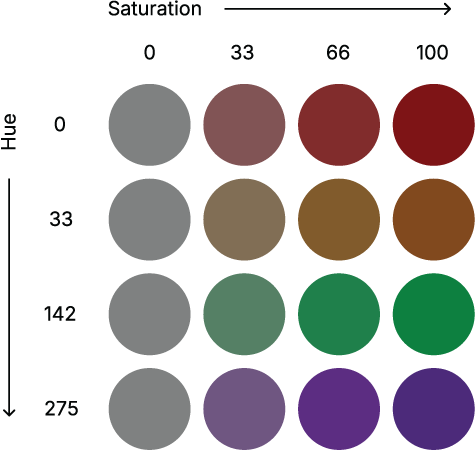
Hold a hue steady and raise saturation: the color travels from gray toward richer, more vibrant color. The figure makes the single control feel less mysterious than its name suggests. section 4.2.2
In HSB (also called HSV), saturation runs from 0% to 100% alongside hue and brightness. Brightness still matters: at 0% brightness, every combination of hue and saturation is black. In HSL, saturation works similarly, but lightness sets the endpoints: 0% lightness is black, 100% is white, and a fully saturated true color sits at 50% lightness. section 4.2.2 section 4.2.3
Use saturation as a practical emphasis control in color palettes:
- For a single-hue sequential scale, move from gray toward full color to map smaller values to less color and larger values to more color. section 4.3.1
- Vary lightness as well as saturation. A saturation-only gradient can lose low values against the background and may not remain clear in grayscale. section 4.3.1
- When one category grabs attention it has not earned, lower its saturation rather than changing its hue outright. section 4.3.3
- Treat adjustments as trade-offs: changes that improve balance or distinction for one viewer may not improve them for a colorblind viewer. section 4.3.3
Tuning an unruly categorical palette
A sunset-inspired palette contains a yellow that pops too strongly, an almost-black bar, and tan too close to yellow. Dialing down the yellow’s saturation reduces its accidental emphasis. Raising saturation and lightness can make a very dark, desaturated magenta read more distinctly, while similar adjustments can move tan toward brown. The hues can remain unchanged, yet the palette becomes more balanced—although accessibility still needs checking. section 4.3.3






