A generative AI feature that works locally is not necessarily safe to publish. Without access restrictions, anyone can send requests and consume paid LLM API credits. Security also means protecting user information and limiting misuse of generated content, including impersonation and misinformation. section 2.6 section 1.6.1
Treat each request as a sequence of checks before it reaches application logic. Validate input, apply security middleware and rate limits, then enforce authentication and authorization where features or data require them. Manage provider API keys as secrets rather than hardcoding them in application code. Limited access for unauthenticated visitors, followed by authentication and a usage plan, can help control abuse and costs. section 9.1 section 9.2
Figure 9.1 The multilayered security checks from user input validation through request processing, showcasing multiple defensive layers including input validation, security middleware, and rate-limiting mechanisms
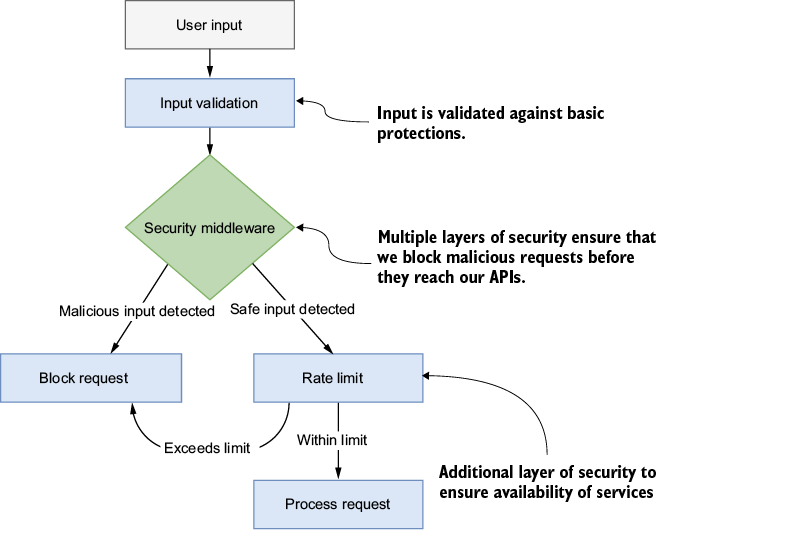
The diagram traces a request through input validation, security middleware, and rate limiting before processing. section 9.1
Match the controls to what the application exposes:
- For a public conversational feature, authenticate users, restrict allowed origins, limit request frequency, and set security headers. An AI interview assistant places these checks in middleware before requests reach its core logic. section 10.2
- For document uploads, authorize access and validate file type and size on both client and server. Parse and chunk documents on the server with error handling. Rate limits, upload quotas, malware scanning, and encrypted storage are further safeguards to consider—not controls supplied by upload validation alone. section 11.2.2
- For production deployment, configure dependent services such as authentication and rate limiting for the production environment. A baseline checklist includes HTTPS, input validation, and protection against common web vulnerabilities; requirements increase with traffic. section 9.6.1 section 9.6.2
Keep responsibility for API usage visible. Letting users supply their own provider keys can expose them to unexpected charges and complicate client setup; organization-managed keys provide more control over a public service. Provider usage dashboards can help monitor requests and token consumption. These measures form a minimum, not a final security guarantee. section 9.4.3 section 10.2



























