Sentiment analysis gauges the positivity or negativity expressed in text. For customer reviews, it helps teams examine satisfaction and dissatisfaction in the written feedback—not just the star rating. A highly rated product can still receive negative comments about particular features or services. section 7.3 section 7.15
A Python review-analysis workflow follows these steps:
- Collect review text alongside ratings and other fields, then inspect the rating distribution before interpreting sentiment. section 7.15
- Prepare the review body by lowercasing, removing unwanted characters and stop words, tokenizing, and lemmatizing. section 7.15 section 7.20
- Use TextBlob to obtain polarity scores; its sentiment output also provides subjectivity. Convert polarity scores into labeled satisfaction bands and count the results. section 7.15
Ratings versus written opinions
Suppose a service receives many favorable star ratings but its review text describes problems with pricing or customer service. Compare the rating distribution with the polarity-derived satisfaction labels, then read the relevant reviews to identify the pain points. The score is a way to organize that investigation, not a substitute for the comments themselves. section 7.15
# the functions generates polarity and subjectivity here, subsetting the
polarity only here
allReviewsSentiment = reviewData.body[:900].apply(lambda x:
TextBlob(x).sentiment[0])
# this contains boths subjectivity and polarity
allReviewsSentimentComplete = reviewData.body[:900].apply(lambda x:
TextBlob(x).sentiment)
allReviewsSentimentComplete.head()
The Python listing applies TextBlob to the first 900 review bodies, retaining either polarity alone or the complete polarity-and-subjectivity result. section 7.15
allReviewsSentimentDF = allReviewsSentiment.to_frame()
# Create a list to store the data
grades = []

# For each row in the column,
for row in allReviewsSentimentDF['body']:
    # if more than a value,
    if row >= 0.75:
       grades.append('Extremely Satisfied')
    elif (row >= 0.5) & (row < 0.75):
        grades.append('Satisfied')
    elif (row >= 0.2) & (row < 0.5):
        grades.append('Nice')
    elif (row >= -0.2) & (row < 0.2):
        grades.append('Neutral')
    elif (row > -0.5) & (row <= -0.2):
        grades.append('Bad')
    elif (row >= -0.75) & (row < -0.5):
        grades.append('Dis-satisfied')
    elif  row < -0.75:
        grades.append('Extremely Dis-satisfied')
    else:
        # Append a failing grade
        grades.append('No Sentiment')

# Create a column from the list
allReviewsSentimentDF['SentimentScore'] = grades
allReviewsSentimentDF.head()
This listing turns numeric polarity into named satisfaction bands using explicit thresholds; those bands are choices in the workflow rather than categories inherent in the reviews. section 7.15
Figure 7.17 Compare the original distribution of number of stars on the left side and the real results from the sentiment analysis on the right.
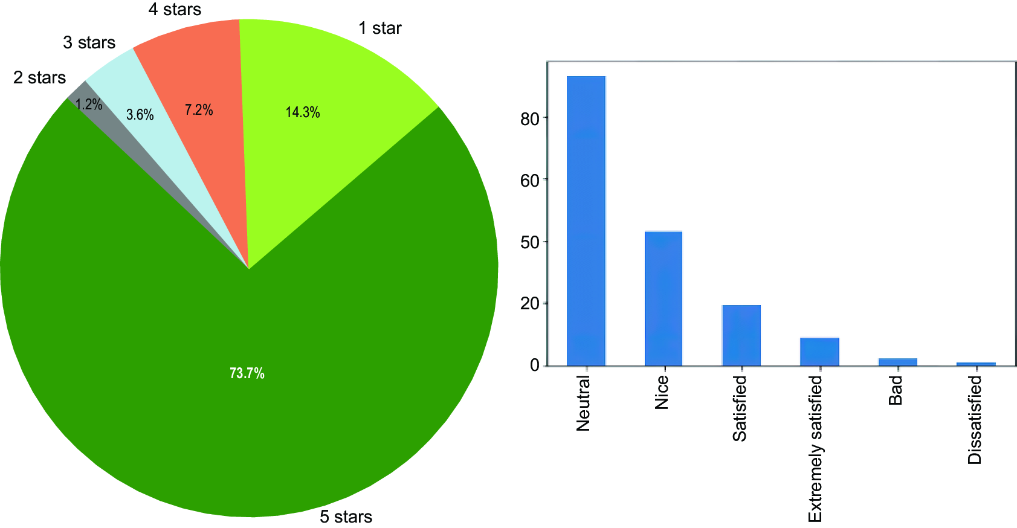
The figure places the original star-rating distribution beside the sentiment-analysis results, making differences between ratings and review text easier to inspect. section 7.15











