A software dependency is something a component or project needs to work: another component, helper, stylesheet, library, or installed package. Web Components can manage their own dependencies instead of relying on a page to list every script. section 5.1 section 5.2 section 12.3
Common ways to manage dependencies include:
- List script and stylesheet files in HTML, then optionally concatenate them for release. As projects grow, keeping every reference up to date can become difficult. section 5.1
- Use JavaScript modules so components import the components or libraries they need. This leaves the main HTML page with a single module entry point. section 5.2
- Track installed packages in package.json, distinguishing dependencies used in production from those intended only for development. section 12.3
A Web Harp built from components
The application imports a component that contains multiple strings, which in turn imports the component for an individual string. The page loads only the application module, while the component structure manages these JavaScript dependencies. section 5.2
Figure 5.3. The index.html page only references a single component, simplifying our code but still allowing many dependencies.
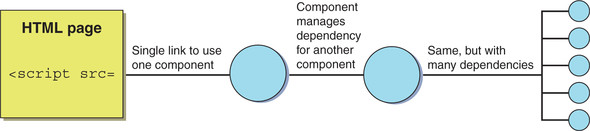
See how one page reference can lead to nested Web Components and their imported dependencies. section 5.2


























