User experience (UX) is what people encounter while using a product or service—not just how its interface looks, but whether they can complete their work without errors, workarounds, or needless effort. Poor UX can undermine trust, slow operations, and limit growth. A redesign may help, but it cannot fix a failure rooted in unreliable behavior or constraints deep in a legacy system. section 3.1.5 section 3.1.6
When the screen is not the whole problem
A rental-car website told a customer to retry payment after its backend returned an error, even though it had created the booking. The customer unintentionally made three bookings and lost trust in the brand. In another system, users could not enter enough information about a case; a character limit embedded in an XML schema and multiple databases made the apparent interface fix difficult. Both failures call for investigating the system behind the interaction. section 3.1.5
Internal users count too. Agents working across three difficult tools faced slow case processing and costly onboarding, constraining plans for a new product. UX should therefore be considered alongside software, business processes, and the domain being modernized. The aim is not to rebuild every old feature with a newer interface: understanding users may reveal work that should be improved, replaced, or removed. section 3.1.6 section 8.0
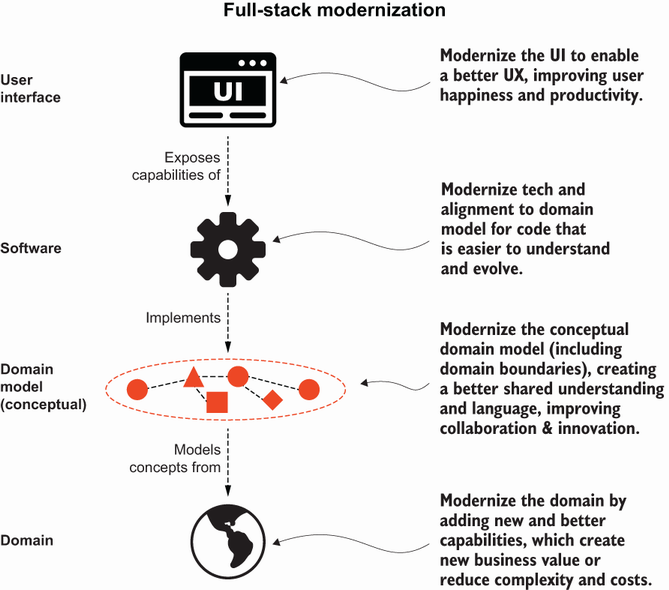
The full-stack view places UX alongside software and the business domain, making it useful for discussing where an apparent interface problem may need broader change. section 8.0
To make UX a practical part of modernization:
- Bring user research, product, interaction, content, service-design, and domain expertise into the team as needed. Look for gaps in capabilities rather than treating job titles as a fixed staffing recipe. section 8.2.1
- Spend time with real users, including employees who use internal tools. Ask what slows them down; where possible, join customer support or experience users’ work directly. section 8.2.5
- Ask what happens if nothing changes. Consider delays, manual workarounds, growth constraints, and error risks—not only the cost of changing a screen. section 8.2.2 section 8.6
- Keep discovery going as changes are made. Check user conversations against existing features, logs, and metrics; use process modeling EventStorming to explore a future experience before settling technology decisions. section 8.6
The cost of an internal interaction
At Citibank, employees intending to pay interest on a loan instead sent the outstanding principal. Three users believed they had administered the transaction correctly, but the interface required overrides they had not all entered. Although the bank later recovered the money, the incident shows why an internal tool’s interaction rules and error risks deserve scrutiny. section 8.2.2
Treat findings as questions for the whole team, not designs to hand off after discovery. A government tax-service modernization rethought UX together with longstanding policies, business rules, and processes, with developers involved in user research. That wider view creates room to improve the service rather than merely replace its technology. section 8.1 section 8.2.1










