User experience in generative AI applications centers on making model interactions readable, responsive, navigable, engaging, accurate, and trustworthy. Long responses, slow generation, hallucinations, and bias can reduce quality and lead to poor decisions. section 1.6.3 section 2.4
Design the interaction around several practical concerns:
- Render long responses as Markdown so users can scan headings, bold text, code blocks, and collapsible sections instead of facing an unformatted wall of text. section 2.4
- Add automatic scrolling or explicit navigation controls so users can follow new messages and move through lengthy conversation threads. section 2.4
- Stream generated content incrementally to reduce perceived waiting time when large language models produce responses slowly. section 3.2
- Validate generated content, constrain knowledge sources, and audit diverse inputs to reduce misinformation and biased behavior. section 1.6.3
Responsive chat interface
A chat application can accept input through a message box, stream the assistant response as it is generated, render the result as Markdown, and automatically scroll when new content arrives. Collapsible sections and keyword highlighting provide additional control over lengthy answers. section 2.4 section 3.2
Figure 3.2 Speed comparison of GPT-4 models served from OpenAI versus Azure. The output token throughput is within a mere couple of dozen tokens per second maximum. (Source https://artificialanalysis.ai)
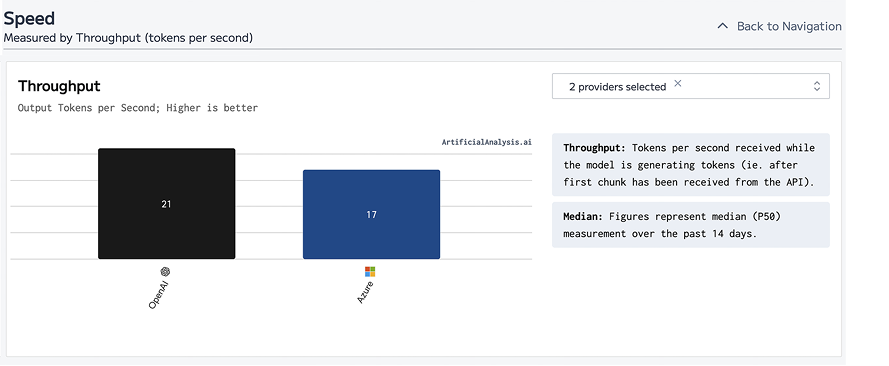
Compare GPT-4 delivery speeds from OpenAI and Azure to see why incremental streaming improves perceived responsiveness. section 3.2










