Version control, also called source control, manages and records changes to a collection of code files. It gives a project a shared history: contributors can see changed files, trace who made a change, restore an earlier version, and combine work instead of accidentally overwriting it. It also serves as a backup when working alone. section 1.2.8 section 1.5 section 2.1
For data science, use version control from the beginning of a project and throughout the data pipeline or machine-learning pipeline. It supports collaborators who are editing extraction code, visualizations, data-cleaning logic, utility files, or model code in the same codebase. section 2.0 section 1.2.2
A typical repository workflow is:
- Keep the project files in a repository, often hosted remotely, and download a local copy to work on. section 2.1
- Create or modify files locally, then commit the latest changes with a brief description of what changed. section 2.7
- Push updates to the remote repository so others can obtain the latest code; pull their updates when needed. section 2.1 section 2.2
- Follow a shared branch policy, since a branch is a copy of the codebase and contributors need an agreed way to use branches. section 2.7
Customer-churn project collaboration
One contributor may change data extraction from one year to three years, while another fixes a visualization bug or handles mixed numeric and string values. Version control makes these edits trackable and provides a way to combine simultaneous changes to the same file, rather than relying on a shared directory where changes can be overwritten or be hard to undo. section 2.0 section 2.1
Git is a freely available, open-source version-control tool used in many data science projects. It can be used from a terminal or through interfaces such as GitHub’s web UI, SourceTree, or GitKraken. section 2.2
Figure 2.3 This diagram is an extension of the one shown earlier. Developers push and pull code to and from, respectively, a remote repository. Each user must first commit his or her code to a local repository before pushing the code to the remote repo.
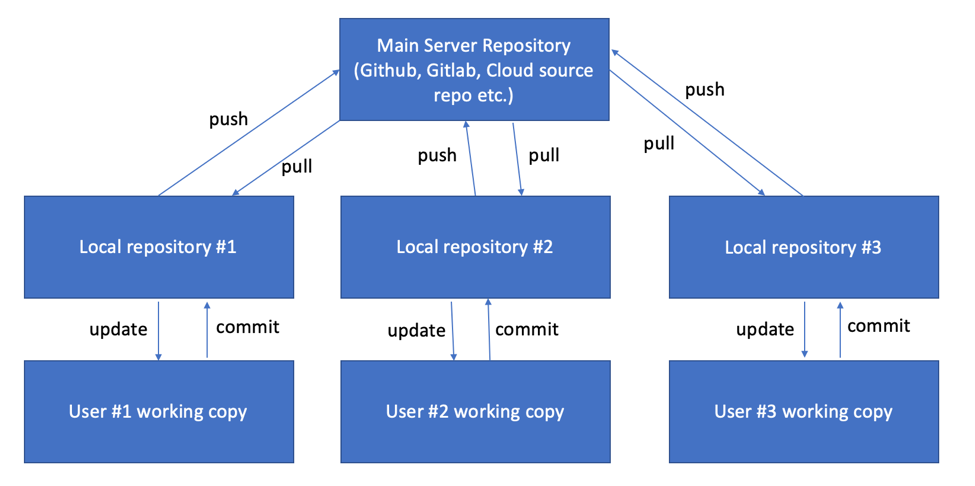
Follow the path from local work to a remote repository: commit locally before pushing, and pull shared updates back down. section 2.2