Authentication verifies identity before a user or client receives access. In a multiuser site, it answers “who are you?”; authorization separately answers “what may you do?” User accounts commonly pair a login ID with a password, while the application uses that verified identity to control access. section 1.1.4 section 6.1
Django stores users through its ORM and handles password encryption and validation. Session middleware tracks whether a user is logged in and can expire a session automatically. The result is an authenticated request that views can use when deciding whether to continue. section 6.1
Require login for a view
Wrap a view with @login_required to admit authenticated accounts and redirect anonymous visitors to the login page. A restricted route can then render its normal template only after login succeeds. Add Django’s built-in auth URLs and provide a registration/login.html template containing a POST form, CSRF token, and the supplied login form. section 6.3 section 6.8
Figure 6.4 Authentication verification steps for visiting a @login_required wrapped view
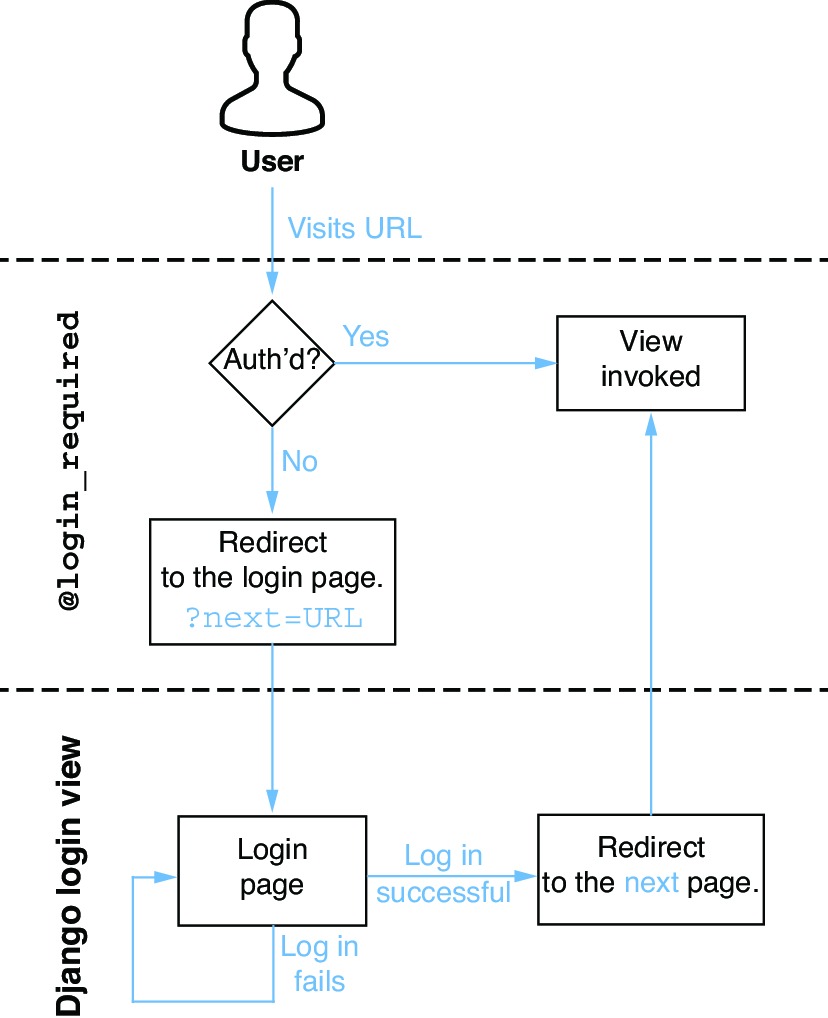
Follow the request path for a login-protected view: authentication is checked before the view’s content is returned. section 6.3
Authentication supports more than the initial login screen:
- Manage user accounts through the Django Admin, including creating, editing, and occasionally blocking accounts. section 1.1.4
- Support password resets by collecting an email address, sending a one-time link, showing a reset form, and confirming completion. section 6.8
- Associate extra user data with a profile through a OneToOneField, or use a custom User object instead. section 6.8
API authentication uses the same identity gate for reads as well as writes. Django Ninja can apply an auth mechanism globally, per router, or per endpoint. Django-based auth fits a web interface that can handle a login redirect; an API key is an alternative for other clients. A custom APIKeyHeader handler can compare an X-API-KEY header with a configured value before allowing the request. section 11.2.5 section 11.2.5
Listing 11.12 Creating an authentication handler based on a key
# RiffMates/api_auth.py
from django.conf import settings

from ninja.security import APIKeyHeader

class APIKey(APIKeyHeader):
    param_name = "X-API-KEY"  #1

    def authenticate(self, request, key):
        if key == settings.NINJA_API_KEY:  #2
            return key  #3


api_key = APIKey()  #4
Use this handler pattern to see how an X-API-KEY header is compared with a configured key for an API request. section 11.2.5
Authentication is not the whole access-control story. @login_required only establishes that an account is active; view-specific authorization still decides whether that account may perform a particular action, such as editing a private resource. section 6.1 section 6.8

































