Authentication verifies who is requesting access before an automation connects to a system, service, or API. Hybrid, cross-platform PowerShell workflows commonly combine credentials, API keys, or SSH keys, so authentication data must be handled deliberately rather than stored as plain text. section 4.2 section 9.3.1
Choose the authentication approach according to the connection being automated:
- Use PowerShell Credential and SecureString objects when scripts require account credentials or other sensitive values. section 4.2
- Prefer SSH key-based authentication for unattended remoting; protect the private key, publish the public key on the server, and use ssh-agent when appropriate. section 5.4.2
- Use API keys when a REST service requires the caller to identify itself, passing the key with the request parameters or body defined by that API. section 9.3.1
- Validate the remote SSH host separately from user authentication by confirming its host key and retaining it in known_hosts. section 5.4.2
Authenticated geolocation request
Retrieve the public IP, place the API key and IP address into a hashtable, and pass it to Invoke-RestMethod. The returned location can then populate an operational document or report.
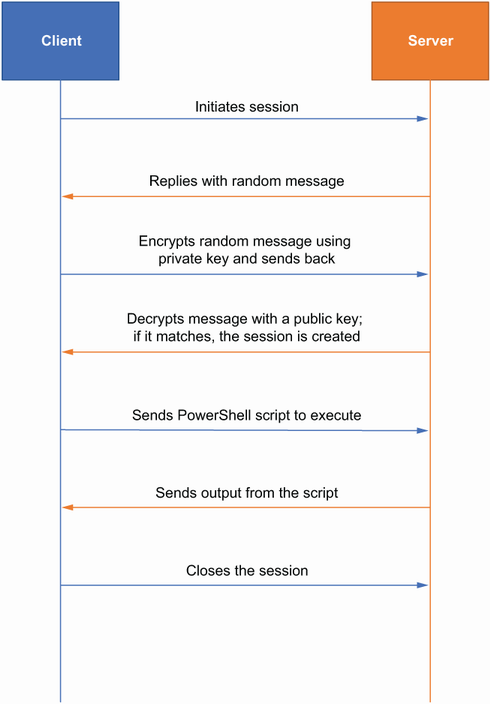
Shows how an SSH client uses a private/public key pair to authenticate remote PowerShell execution. section 5.4.2

































