A dataset is a structured collection of related data values treated as one unit for analysis or visualization. In D3 projects, it commonly arrives as a CSV or JSON file, is loaded into JavaScript, formatted, measured, and bound to visual elements. section 1.1.3 section 3.0
A practical dataset workflow usually involves these steps:
- Find or assemble data, often using an existing public dataset. section 3.1.1
- Load the dataset with a D3 fetch function, then format values such as numbers and dates. section 1.1.3 section 3.2
- Inspect characteristics such as minimum and maximum values before mapping data to visual properties. section 1.1.3
- Bind data points to SVG shapes and use scales to translate values into positions, sizes, or colors. section 3.0
- Filter or preprocess the dataset when a visualization needs distributions, bins, or interactive subsets. section 6.6 section 7.2.3
An array of data objects
A small employee dataset can be represented as an array of objects, with each object storing properties such as id, name, position, and works_with_d3. JavaScript iteration supports common operations: convert string IDs to numbers with forEach, extract names with map, retain matching employees with filter, or locate one record with find. section 1.2.5
Figure 1.7 How to approach data visualization with D3.js
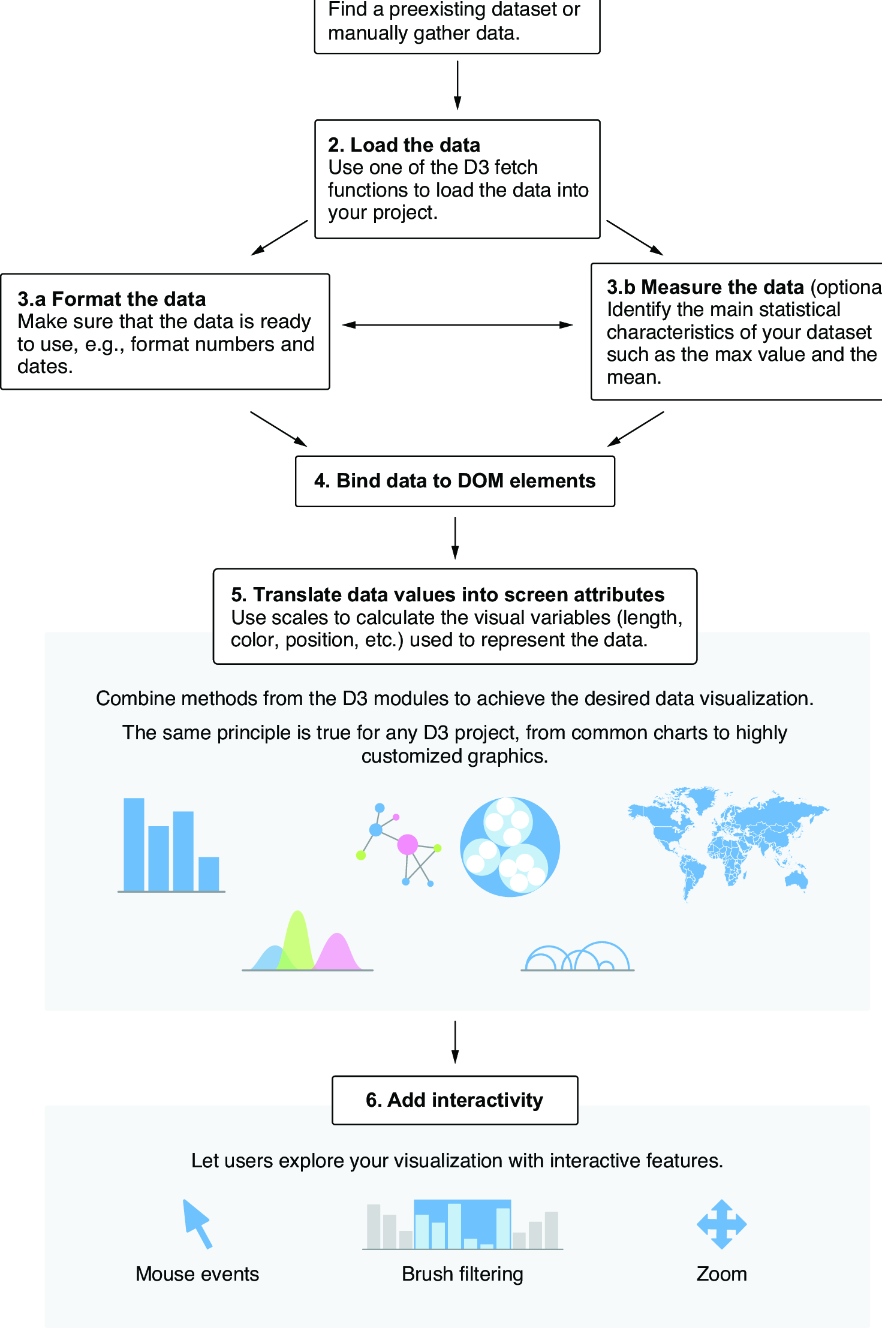
Use the D3 data workflow diagram to trace how a dataset moves from loading and preparation to visual encoding. section 3.0























