A digital image is a visual asset that can make online content clearer, more engaging, and more useful. Effective websites choose images that support the site’s purpose rather than adding decoration for its own sake. section 1.6.9 section 8.0
Check each image against the surrounding page:
- Relevance: show content that clearly supports the page’s main message. section 6.9.3
- Integration: coordinate the image’s placement, size, contrast, style, captions, and nearby text with the rest of the design. section 6.9.3
- Performance: avoid using so many images that visitors with slow connections experience delayed page loads; test the page at pagespeed.web.dev. section 8.1.1
When a good photograph is still the wrong image
A high-quality photograph of raw potatoes can weaken an Instant Pot home page when it appears in an arbitrary location, uses a dark background, feels too small, lacks context, and does not match the page’s lighter visual style. A dish, cooking appliance, or kitchen scene would communicate the page’s theme more directly. section 6.9.3
Figure 6.21 Somebody thought it was a great idea to stick random potatoes into the image in an arbitrary location and with a different background color. The kindest word to describe this suggestion is oblivious.
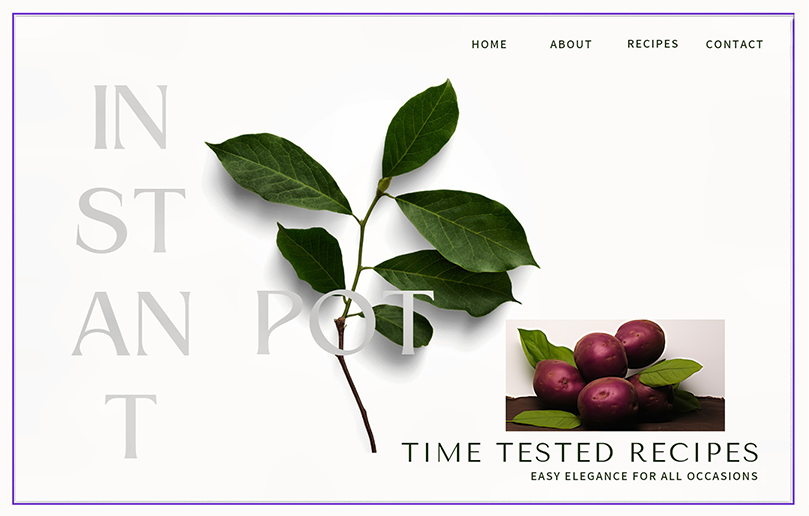
Inspect the potato image’s arbitrary placement and mismatched background as a quick visual exercise in image integration. section 6.9.3















