Kubernetes runs containerized applications across a cluster of nodes. It is also software you interact with through a REST API: objects such as Deployments are addressed as API resources. For an administrator, the practical question is both what state to request and whether the cluster reaches it. section 1.10 section 1.4
A cluster has a control plane and worker nodes. The control plane provides the API and coordinates work; workers run containers and report their health through the kubelet. A Deployment manages ReplicaSets, which run pods—the smallest deployable units—across nodes. section 1.4.1
Figure 1.4 Kubernetes architecture showing nodes, pods, Deployments, and ReplicaSets
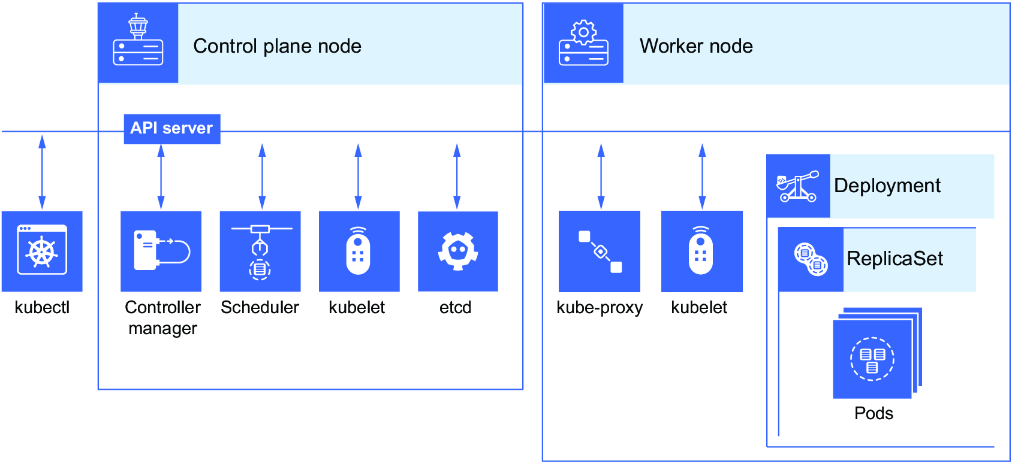
Use the architecture diagram to trace a Deployment through ReplicaSets and pods to the nodes that run them. section 1.4.1
Use kubectl to work with cluster objects, or access the API programmatically. Access requires certificate-based authentication; the API is the hub for authentication, authorization, and communication. For workloads, prefer describing the desired end state over issuing a sequence of imperative commands. section 1.10 section 1.7
Check a workload’s DNS path
CoreDNS provides Service discovery in the cluster. To investigate a pod’s DNS resolution, check its /etc/resolv.conf for the DNS IP address and search criteria. When resolving a name in another namespace, use the pod’s fully qualified domain name. This connects an observable result inside a pod to the cluster service that supplies DNS. section 6.8
Build practice around a local kind cluster and exam-like tasks rather than memorized definitions. Work in the Linux terminal, inspect the resulting cluster state, and revisit components you cannot locate or explain. Container and Linux experience matter: this is administrator practice, not an introduction to containers. section 1.2 section 1.1 section 2.0





















