Kubernetes is a platform for deploying and managing applications that run in containers. Instead of choosing a computer for each application, you describe what should run and submit that description to Kubernetes. It places the application, keeps it running, and reports its status. Think of it as an operating system for a cluster: it presents many computers as one deployment area. section 1.1.1 section 1.2.1
The description is usually a YAML or JSON manifest containing Kubernetes objects. These can represent an application deployment, its running instances, and a service that gives clients one address for reaching those instances. Kubernetes works declaratively: when the description changes, it works to make the running application match. If an instance fails, it can restart or recreate it. section 1.2.4 section 1.1.1
Figure 1.14 Deploying an application to Kubernetes
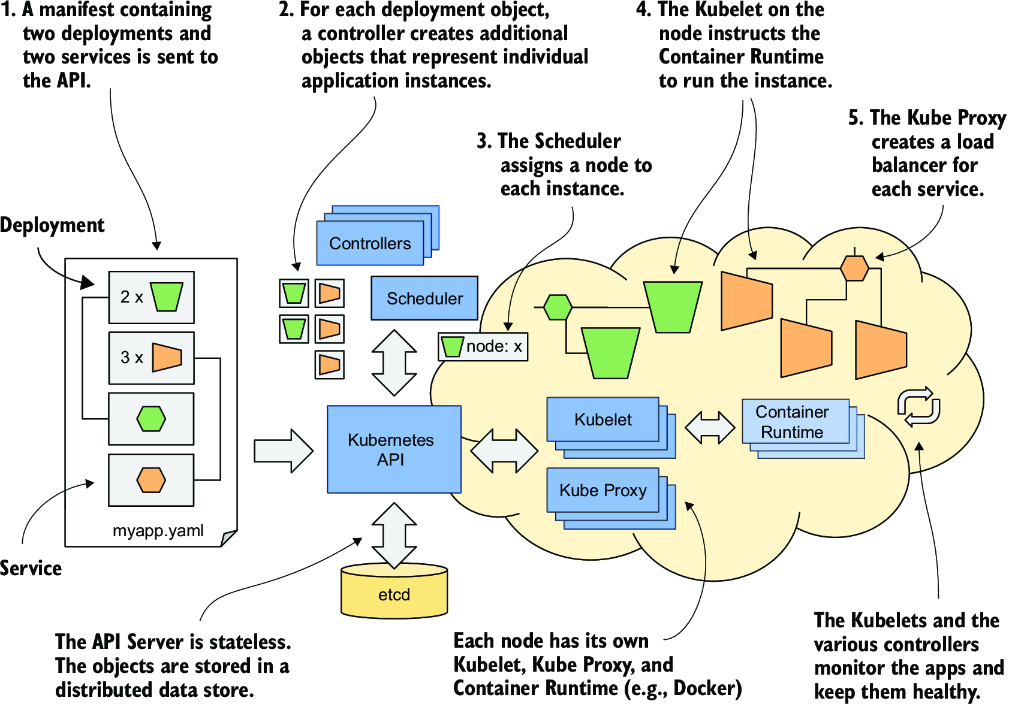
Follow an application manifest with two deployments and two services into the cluster; the diagram connects the objects you submit with the applications Kubernetes runs. section 1.2.4
A cluster divides that work between two groups of nodes:
- Control plane nodes manage the cluster. The API Server accepts objects, etcd stores them, controllers act on them, and the scheduler chooses worker nodes for application instances. section 1.2.3
- Worker nodes run applications. A Kubelet starts an assigned instance through a container runtime; worker-node components also help monitor applications and provide connectivity. section 1.2.3 section 1.2.4
This division lets developers deploy without knowing every node. Kubernetes also provides service discovery, load balancing, horizontal scaling, and self-healing, reducing the infrastructure work each application must handle. It is especially useful when many independently deployed microservices would be difficult to manage by hand. For a simple monolith or just a few services, its complexity may not pay off. section 1.2.1 section 1.3.4
Start with a development cluster
On macOS or Windows with Docker Desktop installed, open Settings → Kubernetes and turn on Enable Kubernetes. This starts a single-node setup suitable for exploring most concepts, though it is not a multi-node production cluster. Kind and Minikube are other local options; managed cloud services provide another route without requiring you to manage Kubernetes itself. section 3.1.1 section 3.1
Using a cluster and operating one are different commitments. A production installation needs multiple machines and suitable networking; managing it requires much deeper knowledge than submitting applications to its API. Consider a managed cluster if the goal is to deploy applications rather than maintain the platform. section 3.1 section 1.3.2





















