An MCP client is a connector created by a host application to maintain a connection with an MCP server and translate between host operations and MCP requests and responses. Each client has a dedicated one-to-one session with one server; a host connecting to three servers uses three clients. section 4.5.1
A client participates in a typical interaction in four steps:
- Discovery: queries its server for available resources, tools, and prompts; the host aggregates capabilities across clients into a catalog for the model. section 4.5.1
- Request formulation: the agent selects a discovered capability and forms a structured request. section 4.5.1
- Execution: sends the request to the corresponding server, which validates it and invokes the underlying API or service. section 4.5.1
- Response: receives the server’s standardized result and uses it to update the model’s context for further reasoning or an answer. section 4.5.1
Figure 4.5 High-level architecture of an MCP-enabled AI agent: the host uses dedicated clients over STDIO or streamable HTTP to discover and invoke tools, resources, and prompts across independent MCP servers
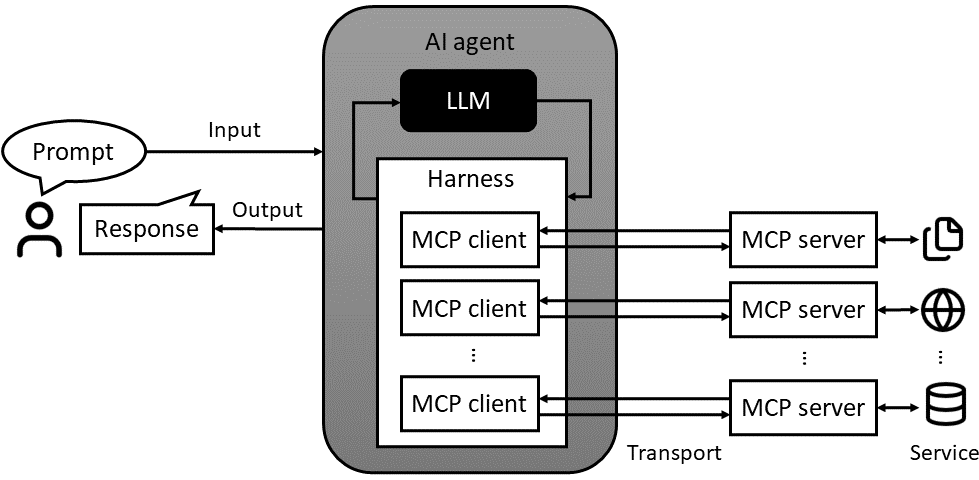
The architecture diagram shows how a host uses separate clients to discover and invoke capabilities across MCP servers, over local or remote transports. section 4.5.1
Filesystem access
Goose Desktop can act as an MCP client, starting a local Filesystem server over STDIO on demand. The agent can ask it to save a poem or summarize text files. Returned file content enters the model context as an observation and should be treated as untrusted input. Restrict access to a dedicated, sandboxed folder because the server may read, modify, or delete files there. section 4.6.3