pandas is a Python library for in-memory tabular data analysis. Its data frames make loading, cleaning, reshaping, and calculating over tables convenient, but convenience does not guarantee low memory use or fast execution. Measure the workload before choosing an optimization. section 7.0 section 7.6
Start with the data-loading and computation costs that matter to the workload:
- For CSV input, compare read time, disk size, and data-frame memory use. Compression can save disk space while increasing load time; select only needed columns and specify types where possible to reduce memory use. section 7.1 section 7.1.1 section 7.6
- For analysis, prefer vectorized operations to explicit row loops. Indexing and iteration strategies can have markedly different costs. Extract NumPy arrays when that helps a measured bottleneck; Cython operates on those arrays rather than directly on pandas objects, while NumExpr can suit large frames and complex formulas. section 7.3 section 7.3.3 section 7.6
- If loading or transferring data is the bottleneck, consider Apache Arrow as a complement rather than a wholesale replacement. If the full CSV cannot fit in memory, read it with a chunksize and process successive data frames. section 7.4.1 section 8.3.2
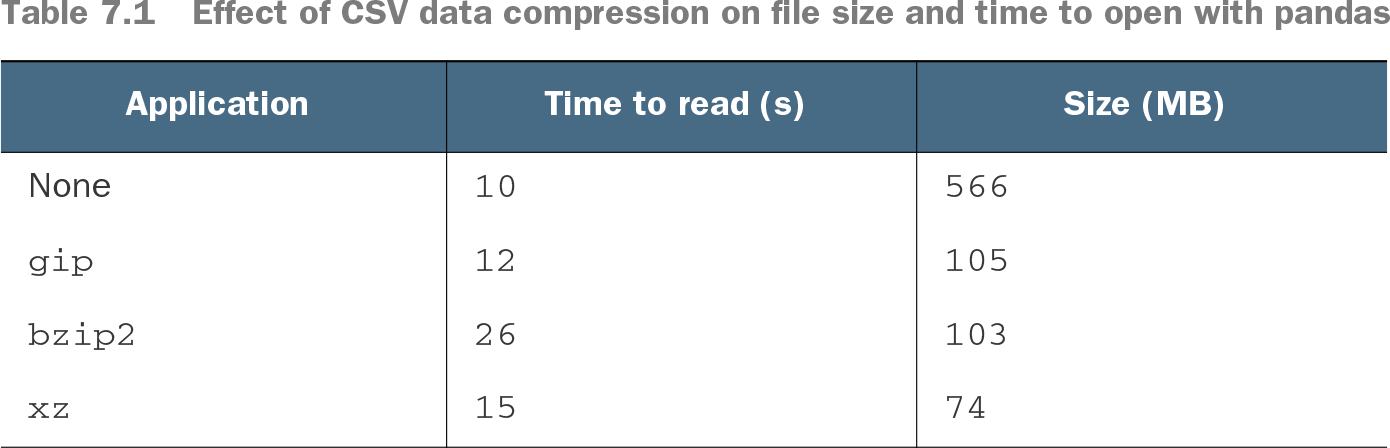
Table 7.1 Effect of CSV data compression on file size and time to open with pandas (view table figure)
The CSV compression comparison makes the disk-space versus read-time trade-off concrete: on the measured machine, xz reduced a 566 MB file to 74 MB but increased reading time from 10 to 15 seconds. section 7.1.1
A pandas analysis baseline
Read state tax data, replace nonnumeric amounts, pivot tax types into columns, exclude states without property-tax values, then divide property taxes by total taxes. This produces a baseline for comparison with Dask. section 10.1.1
Convert a large CSV in chunks
Use read_csv(chunksize=1000000) to obtain successive data frames instead of loading the entire taxi file. Specify types consistently across chunks, convert each chunk to an Arrow table, and append it to a Parquet file. section 8.3.2