pandas is a Python package for processing tabular data through Series and DataFrames. A DataFrame is an ordered, two-dimensional collection of columns with labeled rows and columns, suited to mixed numeric, ordinal, categorical, date, string, and boolean values. Labels or integer positions can select rows and columns, making records and features directly inspectable. section 2.1.3
Listing 2.1 Creating a simple tabular dataset
import pandas as pd
data = {'gender': ['male', 'female', 'male', 'female'],
        'age': [25, 30, 27, 29],
        'education_level': ['Bachelor', 'Master', 'Bachelor', 'PhD'],
        'income': [50000, 60000, 55000, 70000]}              #1
index = [ 'Bob ', 'Alice', 'Charlie', 'Emily']               #2
df = pd.DataFrame(data, index=index)                         #3
print(df)
print(df.iloc[1])                                            #4
print(df.loc['Alice'])                                       #5
Create a four-person DataFrame from a dictionary, label its rows, then retrieve Alice’s record by integer position with iloc or row label with loc. section 2.1.3
Use pandas as a working layer between raw data and analysis: load data from multiple sources, select rows and columns, handle missing values, compute or rename features, group and aggregate values, and pivot, reshape, or visualize results. The DataFrame index can play a role similar to a relational database primary key. section 2.1.3 section 2.3.1
For assembling and exploring business data, pandas provides SQL-like operations while preserving an inspectable Python workflow:
- Select, filter, aggregate, order, and process tabular data using principles similar to relational queries. section 2.3.1
- Merge event, item, and dimension tables while checking intermediate results and retaining control over data types and ordering. section 2.3.1
- Prefer SQL when all data resides in a relational database; prefer pandas when combining diverse sources and exploring results interactively. section 2.3.1
Load an Auto MPG table
A fixed-width Auto MPG file can be downloaded and loaded into a DataFrame with read_fwf by supplying column positions and names. For a CSV version, use read_csv instead; the reader follows the storage format rather than a single universal layout. section 2.4.1
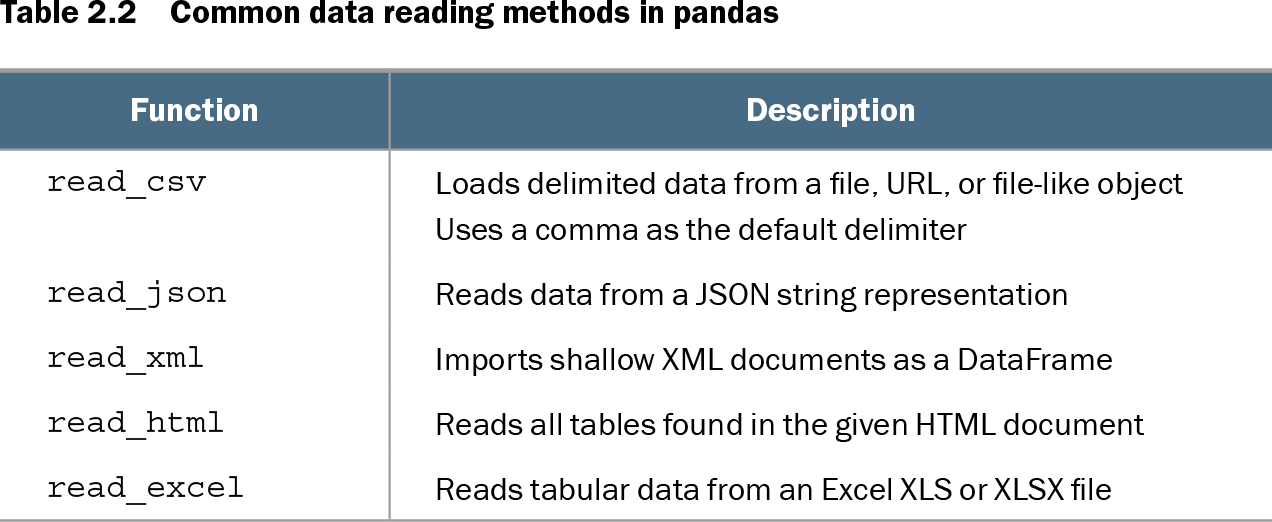
Table 2.2 Common data reading methods in pandas (view table figure)
| Function |
Description |
|---|---|
| read_csv |
Loads delimited data from a file, URL, or file-like object Uses a comma as the default delimiter |
| read_json |
Reads data from a JSON string representation |
| read_xml |
Imports shallow XML documents as a DataFrame |
| read_html |
Reads all tables found in the given HTML document |
| read_excel |
Reads tabular data from an Excel XLS or XLSX file |
Choose a pandas reader by source format: delimited files, JSON, shallow XML, HTML tables, or Excel workbooks each have a dedicated function. section 2.4.1
After loading data, pandas supports fast exploratory checks before modeling. Inspect initial rows with head, count distinct values with nunique, measure numeric spread with std, identify missing values with isna, summarize distributions with describe, and tabulate category frequencies with value_counts. These checks help distinguish numeric, ordinal, and categorical features and expose data issues. section 2.4.2 section 2.5
Explore feature types and quality
For Auto MPG, low distinct-value counts suggest treating cylinders and origin as categorical, while domain knowledge can treat cylinders and model year as ordinal. Missing-value counts reveal absent mpg and horsepower values; summary statistics, boxplots, histograms, and bar plots reveal distributions and possible anomalies. section 2.4.2 section 2.5