A Snowpark data frame is the core tabular abstraction for a relational data set. It is used to query and transform data with methods for selection, filtering, ordering, grouping, combining, and joins. Snowpark translates those operations into SQL for execution by Snowflake’s server-side SQL engine, so developers can choose data-frame methods or SQL according to their workflow. section 6.1 section 6.8
Data frames are lazily evaluated. Constructing one or chaining transformations does not immediately execute work; execution is triggered by an action such as collect(), count(), show(), save_as_table(), or copy_into_table(). Deferring execution lets a pipeline batch operations, generally reducing data transferred between client and server and improving performance. section 6.3.4 section 6.5
Create and use a data frame in a pipeline by:
- Creating it from Python values with create_dataframe(), while declaring columns and types through StructType and StructField. section 6.5
- Reading staged CSV data with read.schema(...).csv(...), supplying a schema when column control is required. section 6.6
- Retrieving a Snowflake table with session.table() and combining data frames with join(). section 6.7
- Materializing results as a table with save_as_table(), loading with copy_into_table(), or publishing a view with create_or_replace_view(). section 6.5 section 6.6 section 6.7
Add a holiday flag to staged orders
Load ORDERS_STG and DIM_DATE as data frames, then left-join ORDERS_STG.DELIVERY_DATE to DIM_DATE.DAY. The resulting data frame adds the date dimension’s holiday flag to each order. Rather than materializing another physical table, create the ORDERS_HOLIDAY_FLG view from that result and query it through SQL when needed. section 6.7
Construct and save a date dimension
Build a data frame from a Python list of holiday flags and an explicit two-column schema: day as DateType and holiday_flg as BooleanType. Call collect() to inspect rows, then write the result as DIM_DATE with overwrite mode. The action is required because printing the data-frame object alone does not return its rows. section 6.5
A data frame can also carry structured results from procedural work. CSV returned from an earlier operation can be split into rows and fields, converted with create_dataframe() using a declared schema, appended to a Snowflake table, and returned from a stored procedure for immediate inspection. This makes the data frame a boundary between transformed application output and relational storage. section 7.4.3 section 7.5
Figure 6.1 The Snowpark Python high-level architecture consists of the client API, which includes methods for querying and transforming data frames and defining functions and stored procedures. Data frame queries are internally translated to SQL and sent to the Snowflake server-side SQL engine for execution. Code that defines functions and stored procedures is serialized and sent to the Snowflake server, where it executes in a secure sandbox, using Python built-in packages if needed.
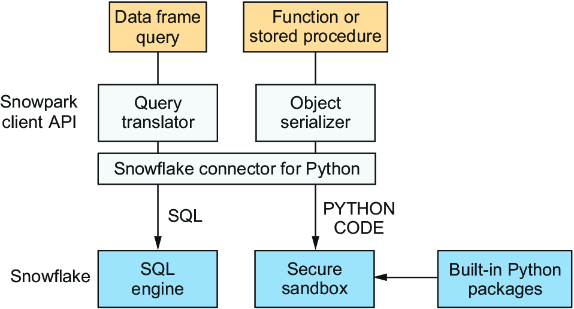
Inspect the architecture to see the division between client-side data-frame methods and server-side SQL execution, alongside the separate path used for functions and stored procedures. section 6.1


















