A data frame is a two-dimensional table organized into rows and columns. Each column stores values of a data type, such as strings, integers, or floating-point numbers. In pandas, data frames provide a practical structure for ingesting, manipulating, and analyzing tabular data. section 1.3.7 section 6.2.1
Common data-frame tasks include:
- Load structured data with pandas read_csv, inspect its Python type and schema with type() and info(), and review sample rows with head(). section 6.2.1 section 6.2.2
- Select columns and filter rows with square-bracket notation, then use the resulting data frame in analysis or a dashboard. section 6.6
Load and preview sales data
Import pandas as pd, load sales_data.csv into df with pd.read_csv('sales_data.csv'), and pass df.head(5) to Streamlit's st.write. The app then displays the first five rows so you can verify that the data loaded correctly. section 6.2.1 section 6.2.2
Figure 1.7 An editable pandas dataframe displayed in Streamlit (see chapter_01/data_editor_example.py in the GitHub repository).
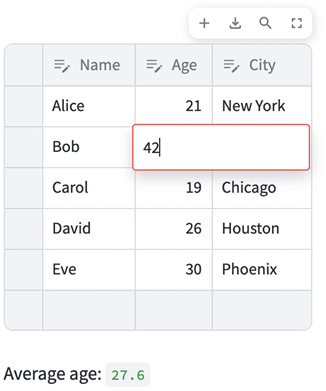
View an editable pandas data frame rendered directly in a Streamlit application. section 1.3.7


















