Python is the primary software tool for bringing robot capabilities to life. Running on Linux, it combines expressive language features with mature libraries for hardware control, computer vision, QR-code detection, and networked web applications. section 1.0 section 1.3.4
The practical workflow is incremental: configure a Python virtual environment, install libraries, and use Python applications to communicate with hardware through Linux interfaces. This includes controlling CRICKIT components over I2C, timing actions, driving motors, and exposing an interactive robot shell. section 2.2 section 3.0 section 4.4
Python serves several reusable roles in the robot software stack:
- Communicate with sensors and output devices such as touch inputs and Neopixel LEDs through Adafruit libraries. section 2.2
- Wrap motor operations in readable functions for forward, backward, turning, and spinning behaviors. section 3.0
- Provide user-facing control through a Python shell running on Linux. section 4.4
- Combine software modules and libraries to build functionality beyond robotics projects. section 1.2.2 section 1.3.1
Robot control pipeline
A Raspberry Pi runs Linux and Python; Python uses the Adafruit CRICKIT library to control a Neopixel LED or touch sensor, while motor functions translate commands into physical movement. section 2.2 section 3.0
Figure 2.4 Software stack: this chapter will cover the installation and configuration of Linux and Python.
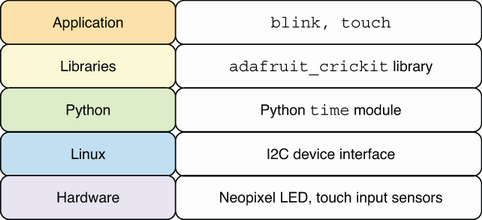
Use the software-stack diagram to locate Python between Linux and the robot hardware and libraries. section 2.2

























