Python is a high-level programming language used to build software and work with data. In Streamlit, Python code can produce rich web applications without requiring separate HTML, CSS, or JavaScript expertise. section 1.3.1
A practical workflow starts with a Python file, imports Streamlit, and runs the file with streamlit run. Editing the file and rerunning the app gives immediate feedback in a browser. section 2.6 section 3.6.1
Python connects directly to visible application behavior:
- Use st.radio to store a user's single choice in a Python variable. section 3.6.1
- Convert text input to a number with float before using the value. section 3.6.1
- Use Python context managers, such as with st.sidebar, to place interface elements in a sidebar. section 3.6.1
A small Python-powered interface
import streamlit as st quantity = st.sidebar.radio("Select a quantity", ["Mass", "Length", "Time"]) st.title("Unit Converter") input_num = float(st.text_input("Value to convert", value="0")) if st.button("Convert"): pass section 3.6.1
Figure 1.2 Streamlit unlocks web app development for anyone who knows Python and helps even full-stack developers prototype and build faster.
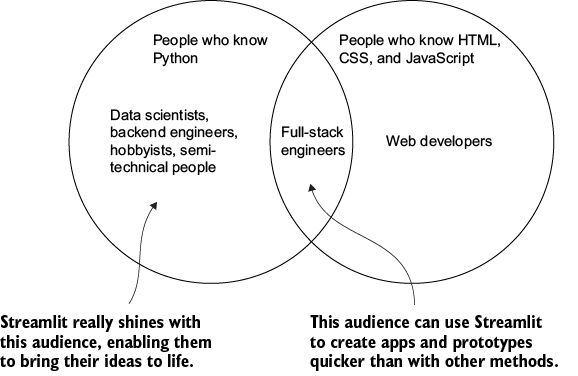
Shows how Python knowledge opens web application development while reducing dependence on a separate web-language stack. section 1.3.1

























